Remote access, alarming and logging
Helmholz supplies the REX industrial routers and the myREX24 V2 portal for secure remote access to PLCs, HMIs and other devices in your machine. The router is the conduit between the machine network and the company network, and connects the machine to the portal via WAN, LTE or WiFi over an encrypted OpenVPN tunnel.
- Outbound connections only: the site firewall needs no open incoming ports
- WAN, LTE or WiFi, with automatic failover from WAN to LTE or WiFi
- NAT, firewall and broadcast filtering between machine and company network
- Free myREX24 V2 account with up to 250 simultaneous VPN connections, configured in the browser
- MPI/PROFIBUS and serial access with the REX 250
- Portal hosted in a European data centre certified to ISO/IEC 27001
- Supports the IEC 62443 requirements: user rights, 2-factor authentication and full logging
- Ambient temperature −40 to +75 °C
Go straight to
Remote access with the REX router as conduit
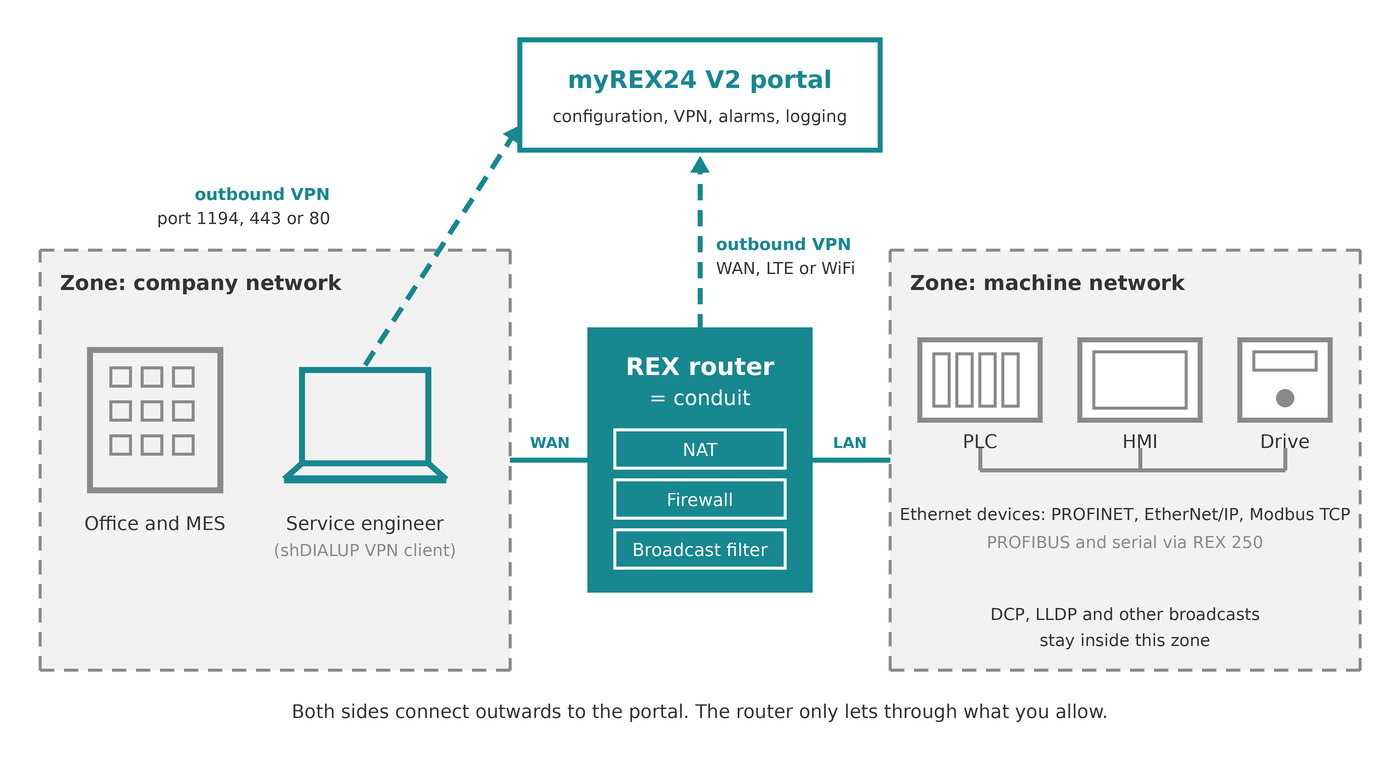
In IEC 62443 terms, the REX router is the conduit between two zones: the machine network and the company network. The service engineer and the router both connect outwards to the myREX24 V2 portal, so the machine is reached only through the portal.
NAT
Series machines keep identical IP addresses; NAT prevents address conflicts when several of them share the shop floor network.
Firewall
In the factory setting the firewall blocks all access from the company network to the machine network; you add exceptions with MAC, IP and packet filters.
Broadcast filter
DCP, LLDP and other broadcast and multicast telegrams stay in the machine network, so the company network stays free of PROFINET traffic.
Background
How myREX24 supports IEC 62443
Remote maintenance is one building block of the security concept of a machine. For each IEC 62443 requirement, the REX router and the myREX24 V2 portal give the machine builder and the operator a shared, traceable solution:
- Identification and authentication. Every user has an own login, with 2-factor authentication by SMS, e-mail, phone call or Google Authenticator. Temporary access for an external specialist is limited in time and number of logins.
- Usage control. Reports show which user was connected to which machine, when, for how long and with how much data. After each connection the user documents the work done.
- Restricted data flow. With the licence 800-874-USR01 a user only reaches the components assigned to him, for example only the PLC, instead of the whole machine network.
- Timely reaction to events. Alarms on internal data points of the router, such as the key switch or a USB stick being plugged in.
- Confidentiality. OpenVPN with OpenSSL (TLS 1.2) and AES up to 256 bit; the portal is only reachable over HTTPS, and every account has its own OpenVPN server.
- System integrity and availability. Fail2ban blocks IP addresses after repeated failed logins. Redundant hosting with up to 99.5 % availability, certified to ISO/IEC 27001, SOC 2 Type II and PCI DSS.
Security
NAT and firewall without remote access
The WALL IE NAT gateway and firewall separates the same two zones on the DIN rail, for machines that need no remote maintenance.
Whitepaper
IEC 62443 using the myREX24 V2 portal
Each IEC 62443 requirement with the matching setting in the portal and the router, for your risk assessment.
REX industrial routers with WAN, LTE and WiFi
Choose the REX by what it needs to do in your machine. Every model is available with WAN, LTE or WiFi; the variants are listed in each tile.
Which REX for your machine
Remote access
Reach PLCs, HMIs and other Ethernet devices for programming and service, and let the operator switch access on with a key switch.

REX 100
Compact router with 3 or 4 LAN ports, 2 digital inputs for a key switch or alarm, and USB-over-IP.
Remote access with logging and alarms
The router also reads PLC data, logs it in the portal, shows it on dashboards and sends alarms by SMS, e-mail or voice call.

REX 200
Always with WAN and 4 LAN ports, 4 inputs and 2 outputs, reads and logs PLC data; dual SIM in the LTE version.
Remote access for PROFIBUS and serial devices
For existing machines with an S7 controller on MPI/PROFIBUS or devices on RS-232/422/485, with all functions of the REX 200.

REX 250
All functions of the REX 200, plus MPI/PROFIBUS up to 12 Mbit/s and a serial RS-232/422/485 port.
Every REX with WAN, LTE or WiFi
LTE
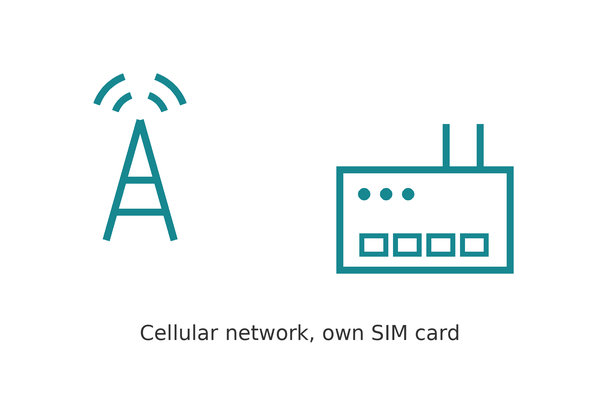
For mobile machines and for remote access independent of the customer’s network, with your own SIM card.


LTE or WiFi + WAN
For connection-critical machines: the modem takes over automatically when the WAN connection is interrupted.
The REX 200 and REX 250 always have a WAN port, so their LTE and WiFi versions always offer failover. With the REX 100 you choose LTE or WiFi with or without WAN.
Note: the LTE versions cover Europe and Asia. For North America, use the REX 100 LTE 700-875-LTE11. Compare the LTE bands of the router with those of the local provider before you order.
myREX24 V2 portal for remote maintenance, alarming and logging
Every REX router is configured, updated and reached through the myREX24 V2 portal. Besides VPN remote access, the portal shows PLC data on dashboards, logs it and sends alarms by SMS, e-mail or voice call, with user groups and two-factor authentication.

Hosted by Helmholz
myREX24 V2 public server
Free account with unlimited devices and users, up to 250 simultaneous VPN connections, 250 data points per device and 5 WEB2go connections, hosted in an ISO/IEC 27001-certified European data centre. Extend it with annual licences when you need more.
On premise
myREX24 V2 virtual server
Runs in your own data centre or at a hoster of your choice: up to 20,000 devices and 250 active connections, permanent VPN access and machine-to-machine networks.
Getting started
From free account to remote access in three steps
No server to install and no change to the customer’s IT: the router only needs an outgoing internet connection.
1. Open a free account
Register on v2.myrex24.net; after verification your login details arrive by e-mail.
2. Configure in the browser
Log in over HTTPS; a short tutorial takes you through the configuration of your first REX router, without extra software.
3. Connect
Open HMI web pages, VNC, RDP or SSH straight from the browser with WEB2go. For full VPN access, such as programming the PLC, use the free shDIALUP client from the downloads on the product page.
Antennas and cables for REX LTE and WiFi routers
Every REX with an LTE modem needs an antenna on the MAIN socket. A second antenna on the Rx socket improves 4G throughput; the MiMo wall antenna has both in one housing.

LTE antennas
SMA connector, for REX 100, 200 and 250 with LTE.

WiFi antennas
RP-SMA connector, for REX 100, 200 and 250 with WiFi.
Before you build
What we check before a machine goes online
- Outgoing port on the site firewall. The router connects to v2.myrex24.net on TCP port 1194 by default. If the customer only allows 443 or 80, set that port in the router and in shDIALUP; the router does not switch ports by itself.
- IP plan of the machine. With NAT, series machines keep the same addresses; decide which devices the company network may reach and release only those in the firewall.
- Who switches remote access on. A key switch on a digital input lets the operator on site decide when the connection may be set up; the portal logs every switch-on.
- Mobile data and reception. A permanent VPN connection uses 100 to 200 MB per month, plus what data points and WEB2go add. Mount the LTE antenna outside the closed control cabinet.
Frequently asked questions about REX routers and myREX24
Your question not listed? Ask us directly.
Do I need the myREX24 portal?
Yes. REX routers are configured and reached exclusively through the myREX24 V2 portal. The free account covers unlimited devices and users and up to 250 simultaneous VPN connections.
Which ports must be open?
No incoming ports. The router and the shDIALUP client connect outwards to v2.myrex24.net over TCP port 1194 by default, or over port 443 or 80 when you set that in the configuration.
Do I need VPN software?
Not for everything. Configuration, dashboards and WEB2go (HTTP, HTTPS, VNC, RDP, SSH) run in the browser over https://v2.myrex24.net. For a full VPN tunnel, for example to program a PLC with its engineering software, you use the free shDIALUP client from the product page downloads.
How does failover work?
The router uses the WAN connection first. When it is interrupted, the LTE or WiFi modem takes over and the machine stays reachable via VPN. Failover is available on the REX 100 LTE/WAN (700-875-LTE51) and WiFi/WAN (700-875-WIF51) and on every REX 200 and REX 250 with LTE or WiFi.
How much mobile data does a REX use?
A REX connected to the portal 24 hours a day uses 100 to 200 MB per month. User connections, data points and WEB2go come on top of that.
Does PROFINET traffic reach the company network?
No. The REX router separates the machine network from the company network as a conduit between two zones: DCP, LLDP and other broadcasts stay in the machine network, and NAT and firewall rules decide what passes.
Does myREX24 meet IEC 62443?
myREX24 supports the IEC 62443 requirements for remote maintenance: identification and authentication, usage control, restricted data flow, confidentiality, timely reaction to events and availability. Remote maintenance is one building block; the risk assessment of the machine remains necessary. The whitepaper explains each requirement.
Can I reach PROFIBUS devices remotely?
Yes, with the REX 250. It has an MPI/PROFIBUS interface up to 12 Mbit/s and a serial RS-232/422/485 port that you reach as a virtual COM port, from 300 to 115,200 baud.
Can I use REX routers in China or North America?
Yes. In China, select the China gateway (Shenzhen data centre, vpncn-v2.myrex24.net) in the router configuration; it is intended for use inside China only. For North America, use the REX 100 LTE 700-875-LTE11; the other LTE versions cover Europe and Asia.
Where is the myREX24 portal hosted?
The public server runs in a high-security data centre of a European hoster, certified to ISO/IEC 27001, SOC 1 and SOC 2 Type II and PCI DSS, with redundant hosting up to 99.5 % availability. For full data sovereignty, the virtual server runs in your own data centre or at a hoster of your choice, with up to 20,000 devices and 250 active connections.
Remote access for your machines
We gladly look at your machine network and the right REX router with you.