Wireless PROFINET, PROFIBUS, CAN, I/O and IO-Link
Helmholz supplies industrial wireless systems that replace the cable for PROFINET, EtherNet/IP, PROFIBUS DP, CAN, I/O signals and IO-Link: from a point-to-point link to roaming across a whole plant, with the antennas to match.
- Transparent like a cable: the PLC project and device configuration stay as they are
- Safety over the air: PROFIsafe, CIP Safety and openSAFETY via UDP
- Point-to-point and multipoint: typically 300 m with Bluetooth 5, which hops around occupied channels, up to 3 km at 869 MHz
- Roaming between access points with 0 ms additional latency and a guaranteed latency
- Antennas, antenna cables and explosion-proof antenna couplers
- Design review, troubleshooting on site and advice

Go straight to
- Selection
- PROFINET, EtherNet/IP
- Roaming
- PROFIBUS
- CAN
- I/O and sensors
- IO-Link Wireless
- Antennas
- Reliability
- Services
- FAQ
Choosing a wireless system
Choose by the application: how many stations, whether they move between areas, and which network the data comes from.
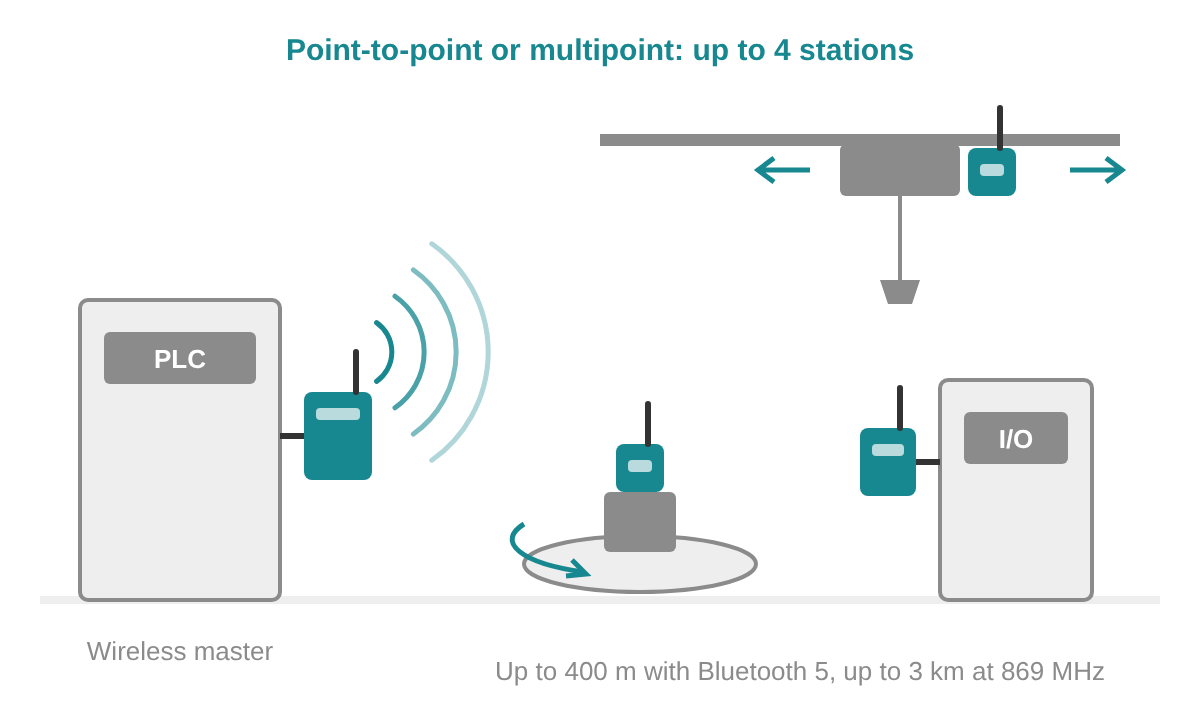
Point-to-point or multipoint
A fixed link or up to 4 wireless stations around one master, such as cranes, rotating tables and remote cabinets. For PROFINET and EtherNet/IP, PROFIBUS and CAN.
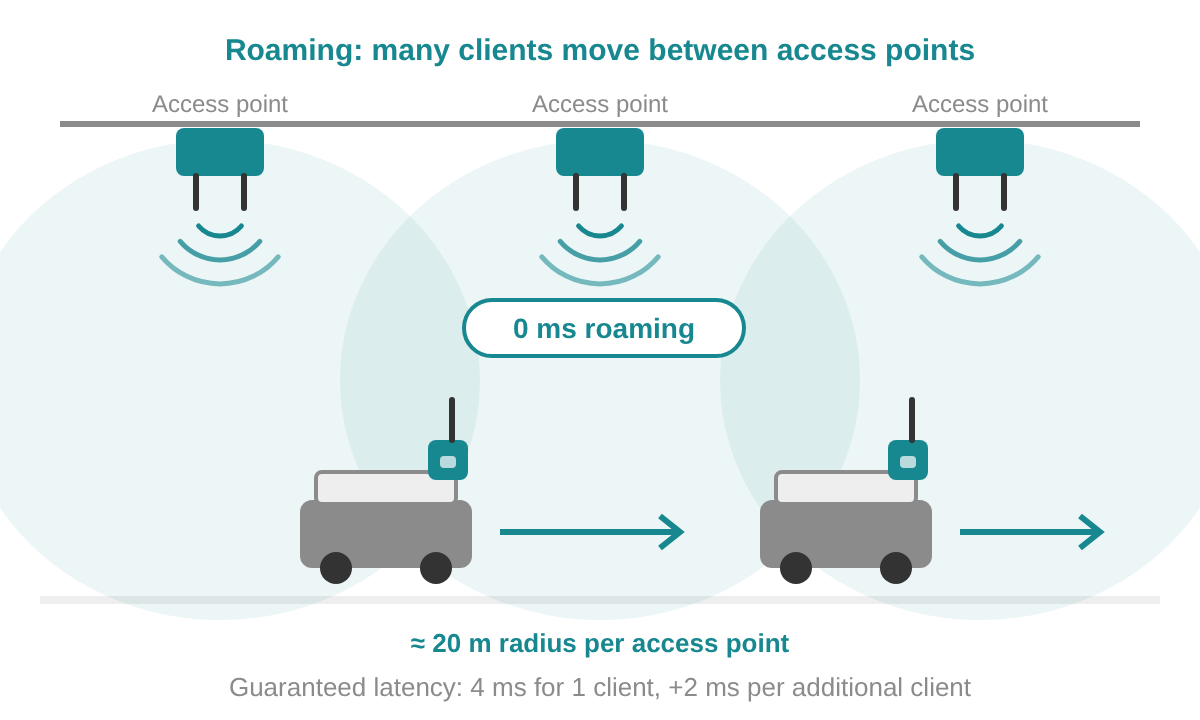
Roaming between access points
Many moving clients, such as AGVs, mobile robots and overhead cranes, that pass several access points with a guaranteed latency.
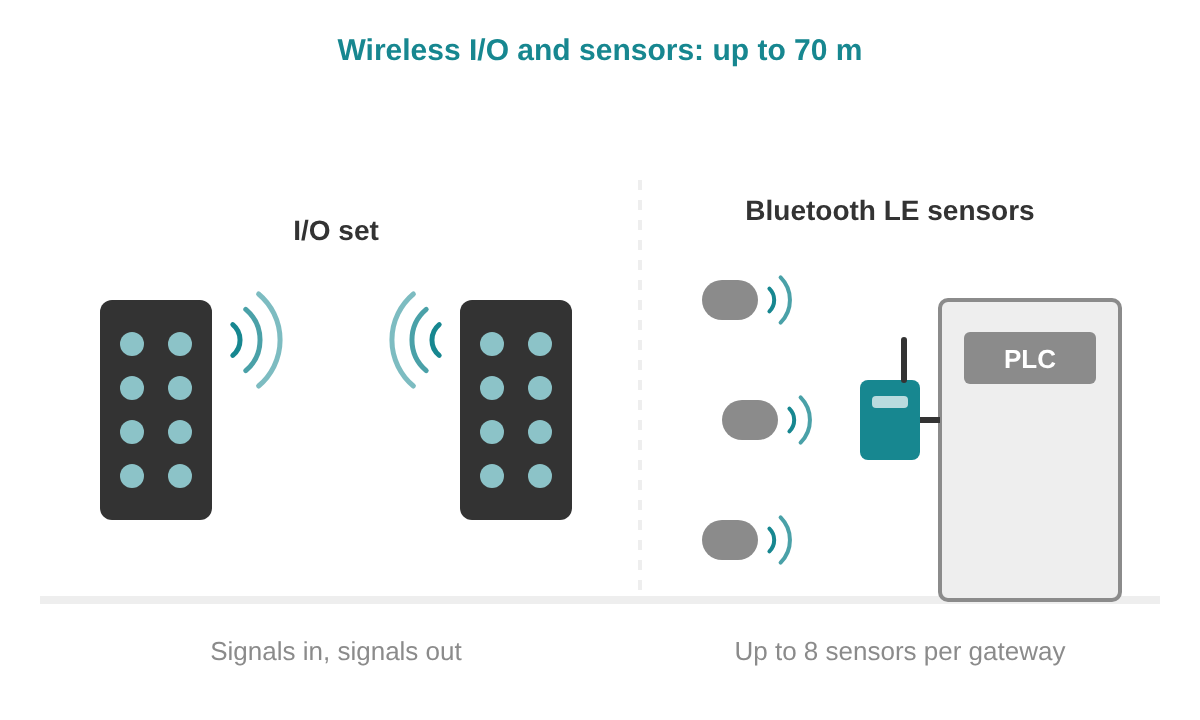
I/O signals and sensors
Digital and analog signals replaced by radio, or Bluetooth LE sensors brought into the fieldbus, up to 70 m.
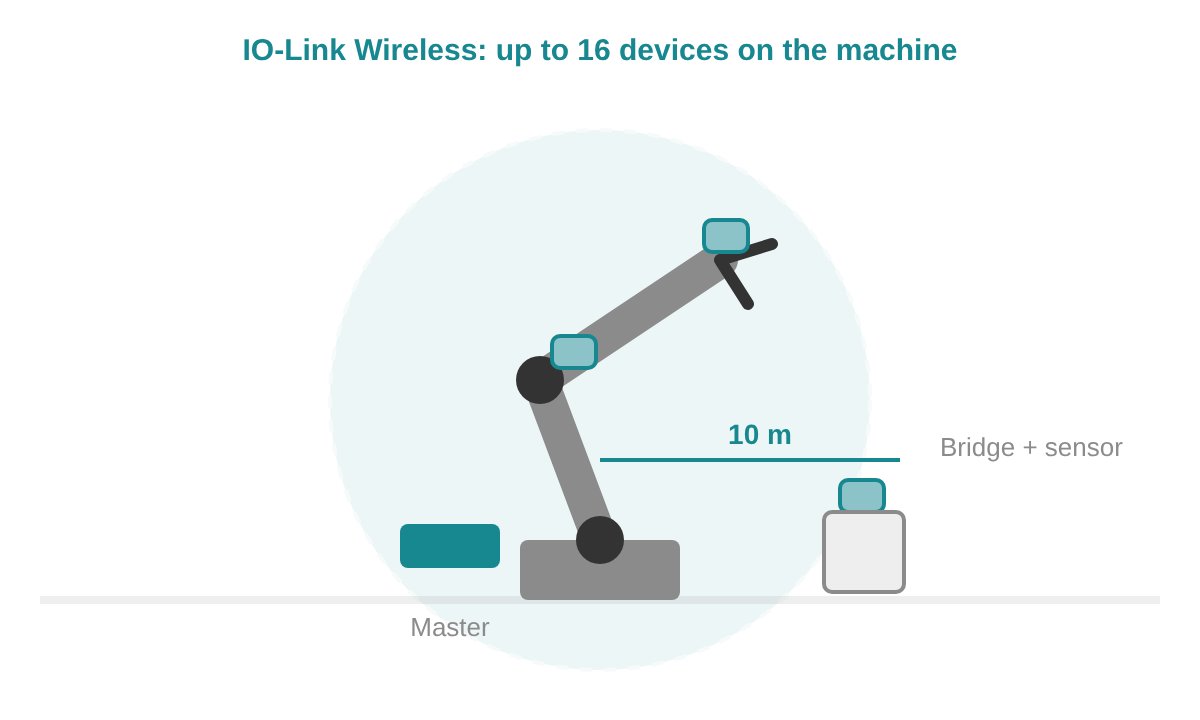
IO-Link on the machine
IO-Link sensors and actuators on robots, grippers and tool changers, up to 16 devices within 10 m.
Filter by protocol














Select one or more protocols to show only the products that support them.
Wireless PROFINET, EtherNet/IP and Ethernet
The dataeagle transmits PROFINET RT, EtherNet/IP and transparent Ethernet: over Bluetooth 5 worldwide, including PROFIsafe, CIP Safety and openSAFETY via UDP, or at 869 MHz for the longest distances in Europe.
With Bluetooth 5 (473x) you order per station a base device and an interface option, master included, plus one configuration set for the link. A PROFIsafe link from one master to two stations in the cabinet is 3 × 15475, 3 × 15483 and 1 × 10003. The 869 MHz version (4333) is a complete PROFINET device for up to 4 radio slaves and 6 PROFINET devices, 1 to 3 km outdoors.

Step 1: base device per station
dataeagle Compact
For the cabinet: DIN rail, IP20, integrated 2-port switch, 24 V DC.

Step 1: base device per station
dataeagle X-treme
On the machine or outdoors: IP65, M12, 24 V DC.
Step 2, Bluetooth 5: interface option per station
Interface options 473x
Multipoint up to 4 radio slaves. The safety options carry PROFINET and EtherNet/IP with PROFIsafe, CIP Safety and openSAFETY via UDP.
Step 3, Bluetooth 5: configuration set per link
Plug and play configuration
One set for the whole link, matching the number of stations.
PROFINET
Components for the wired network
Switches, cables, connectors and diagnostics for the PROFINET network on both sides of the link.
Wireless Ethernet with roaming
BlitzFunk is real-time Wi-Fi for AGVs, mobile robots, overhead cranes and welding robots: a guaranteed latency and 0 ms additional latency when a client moves from one access point to the next.
Each access point reaches up to 50 m with line of sight; placed every 70 m, neighbouring access points overlap for roaming. Each channel group uses two 20 MHz Wi-Fi channels; access points on separate channel groups run in parallel for more capacity, with at least 12 channel groups available in most parts of the world. Per channel group the latency is the number of clients sharing it × 2 ms + 2 ms, and the data rate is 6 Mbit/s divided by those clients: two roaming clients get 6 ms and 3 Mbit/s each, over as many access points as the route needs. Groups do not need to be the same size: eight AGVs in two groups of four get 10 ms and 1.5 Mbit/s each, while a welding robot in a group of its own gets 4 ms and the full 6 Mbit/s. The guaranteed values hold in 99.9999 % of cases.
Protocols: PROFINET, PROFIsafe, EtherNet/IP, CIP Safety, SafetyNET p, MQTT, OPC UA and VDA 5050. Clients are discovered and configured wirelessly from the web interface, and an HTTP API is available.

BlitzFunk Access Point
AW32R. Ethernet M12 X-coded 1 Gbit/s, 12 to 48 V DC or PoE 802.3af, RP-SMA antennas, IP6X, −20 to +60 °C.

BlitzFunk Client
CW32R. On the moving machine: Ethernet M12 D-coded 100 Mbit/s, 12 to 48 V DC, RP-SMA antennas, IP6X.
Industrial Ethernet
Wi-Fi for laptops and service devices
The industrial Wi-Fi access point gives service devices access to the machine network.
Wireless PROFIBUS DP
The dataeagle transmits PROFIBUS DP up to 1.5 Mbit/s with the PROFIBUS configuration kept as it is: over Bluetooth 5 including PROFIsafe, or at 869 MHz for the longest distances in Europe.
With Bluetooth 5 (373x) you order per station a base device, an interface option and the configuration: master on the PLC side, slave at each station. One master and two stations in the cabinet is 3 × 15375, 3 × 15381, 1 × 15383 and 2 × 15384. The 869 MHz version (3333A) is a complete device, ordered as master or slave, for up to 4 radio slaves and 4 PROFIBUS DP slaves, 1 to 3 km outdoors.
Step 1: base device per station
dataeagle Compact
For the cabinet: DIN rail, IP20, SUB-D, integrated PROFIBUS diagnostic slave.
Step 1: base device per station
dataeagle X-treme
Outside the cabinet: IP65, M12, 4-hole screw mounting.
Step 2, Bluetooth 5: interface option per station
Interface options 373x
Up to 4 radio slaves; with PROFIsafe up to 8 PROFIBUS DP slaves.
Step 3, Bluetooth 5: configuration per station
Plug and play configuration
One master per link, one slave for every station.
PROFIBUS
PROFIBUS DP and PA components
Connectors, repeaters, cables and diagnostics for the wired PROFIBUS segments.
Wireless CAN and CANopen
The dataeagle 6000 series transmits CAN and CANopen up to 500 kbit/s, with automatic baud rate detection and 128-bit AES encryption.
Choose Bluetooth 5 at 2.4 GHz for up to 4 radio slaves, typically 300 m outdoors, and 869 MHz for the longest distances, 1 to 3 km outdoors. Compact (IP20, terminal clamps, SUB-D) goes in the cabinet, X-treme (IP65, M12) directly on the machine or outdoors.

dataeagle 6000
CAN and CANopen, 24 V DC, −20 to +60 °C.
CAN bus
CANopen, CAN Layer 2 and SAE J1939
Gateways, cables and diagnostics for the CAN network on both sides of the link.
Wireless I/O and Bluetooth sensors
The dataeagle 2730 family replaces I/O cables by radio and brings Bluetooth LE sensors into PROFINET, PROFIBUS, EtherNet/IP, Modbus TCP or EtherCAT, with a range up to 70 m.
An X-treme IO set is a ready pair: what goes in at one box comes out at the other. The Compact 2730 is a gateway in the cabinet that reads up to eight Bluetooth LE sensors or X-treme IO modules into your fieldbus; order it with one fieldbus option.

dataeagle X-treme IO 2730 sets
4 or 8 M12 ports, PNP or 0–10 V / 4–20 mA, IP67, −20 to +70 °C.

dataeagle Compact 2730
11179. Gateway for up to 8 sensors, DIN rail, IP20, 2-port switch. With one option:
For the Compact 2730
X-treme IO 2730 modules
IO-Link Wireless
IO-Link Wireless, standardised as IEC 61139-3, connects up to 16 IO-Link devices by radio to PROFINET, EtherNet/IP or EtherCAT, with a cycle time from 5 ms per device and a range up to 10 m.

netFIELD IO-Link Wireless Master
Two tracks for up to 16 devices, 2x M12 D-coded, IP67, −25 to +70 °C.

netFIELD IO-Link Wireless Bridge Class A
1912.103. Makes a wired IO-Link Class A device wireless and supplies it with power, IP67.
IO-Link
IO-Link and IO-Link Wireless
Planning an IO-Link Wireless cell, the edge IO-Link master and the FAQ.
Antennas and antenna cables
The antenna decides the range as much as the radio: choose it by how the two ends move, and mount it outside a metal cabinet with a clear view.
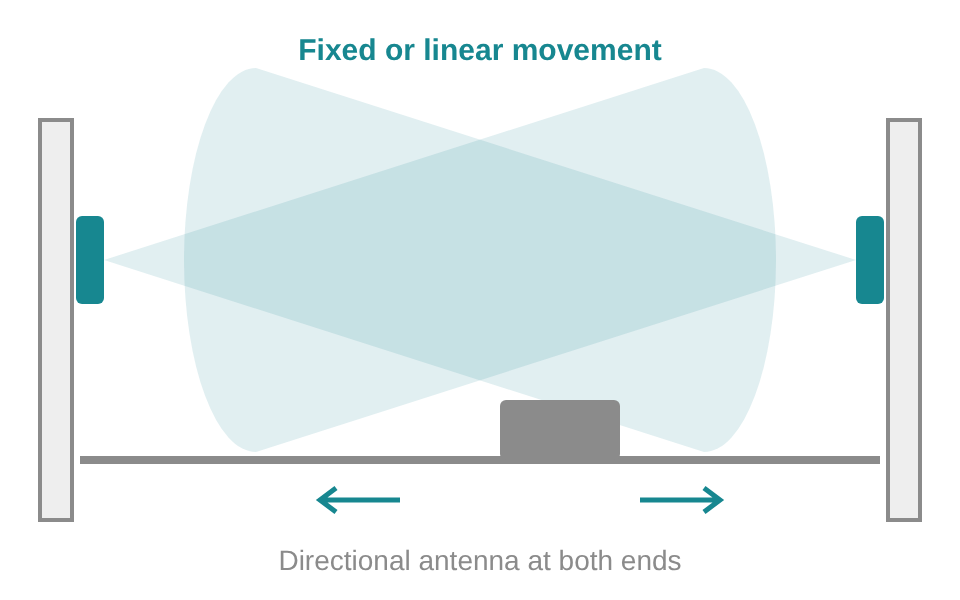
Fixed or linear
Two fixed points, or one moving along a line such as a ceiling crane or elevator: directional antennas at both ends.
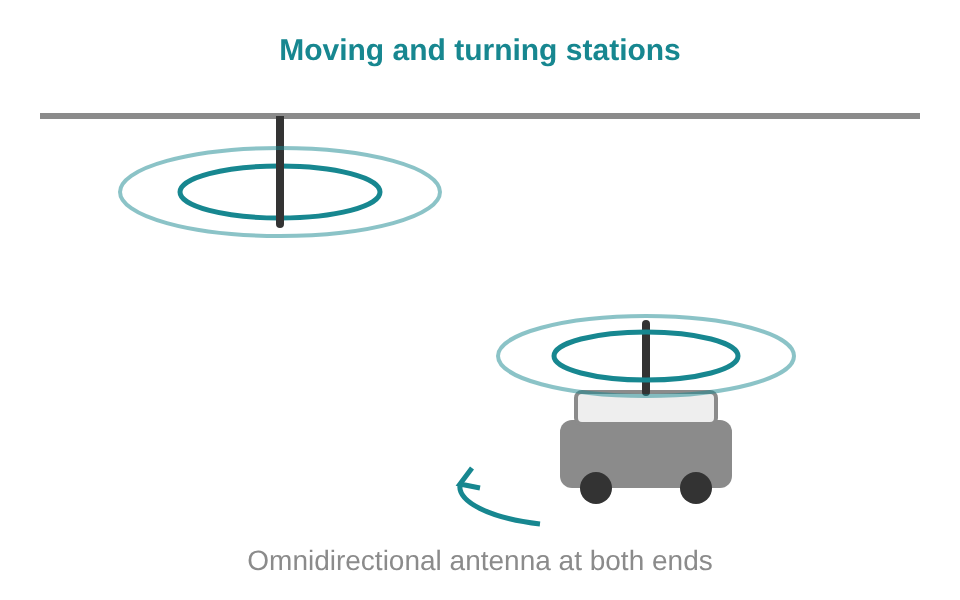
Moving and turning
Stations that move independently, such as AGVs: omnidirectional antennas at both ends.
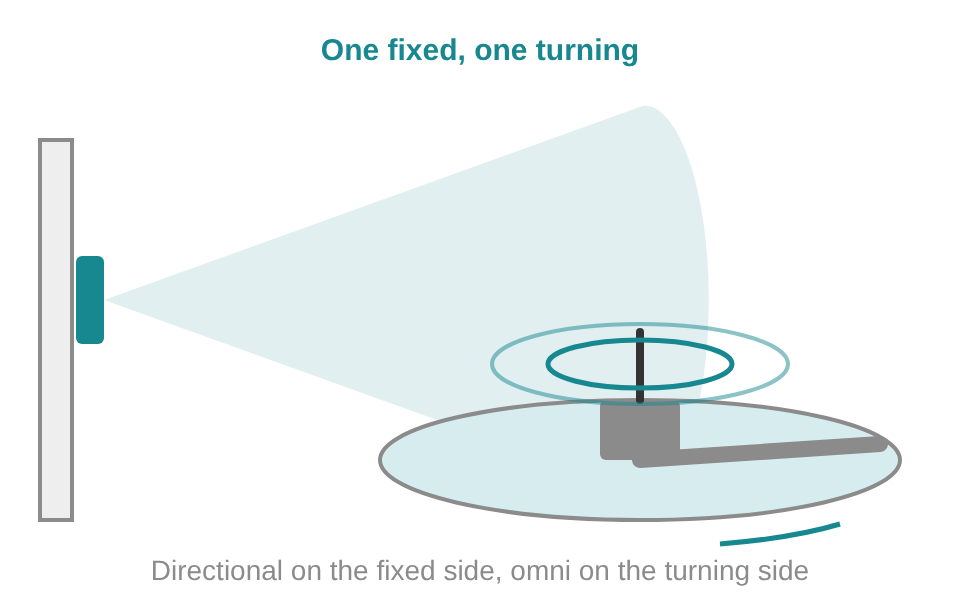
One fixed, one turning
For example a scraper in a basin: directional on the fixed side, omni on the turning side, with overlapping opening angles.

2.4 GHz antennas
For dataeagle devices with Bluetooth, SMA connection.

869 MHz antennas
For dataeagle devices at 869 MHz.

Antenna cables
SMA male to SMA male, other lengths from 1 to 10 m on request.

Explosion-proof antenna couplers
A passive antenna in a hazardous area: ATEX, IECEx, UL, cULus and MSHA approved.
Hazardous areas
Ethernet in Ex zones
Ethernet barriers and Ethernet-APL for the wired network in hazardous areas.
Background
Antenna 101
Antenna gain, opening angles, link budget, cables, connectors and mounting examples.
How each system keeps the link reliable
A PLC expects an answer from its devices within its watchdog time, typically 16 to 128 ms. Each wireless technology keeps the link inside that window in its own way.
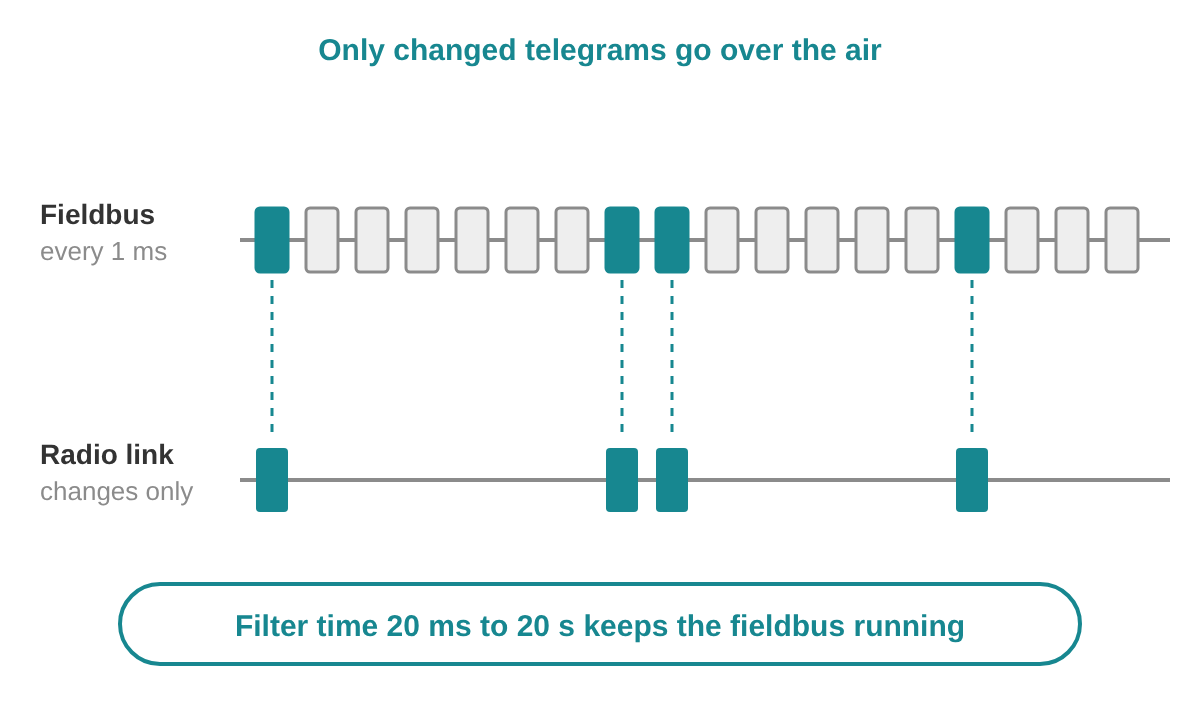
dataeagle: changed data over the air
The dataeagle analyses the fieldbus telegrams in the device itself and only sends the ones that change; the update time after the radio link is about 20 ms. Bluetooth hops between channels and leaves out the occupied ones, so the link shares the band well with Wi-Fi. A filter time, adjustable from 20 ms to 20 s, keeps PROFINET, PROFIBUS or CAN running continuously across short radio pauses. Beyond the filter time the PLC receives the status just as with a cable, so the safety functions respond as designed.
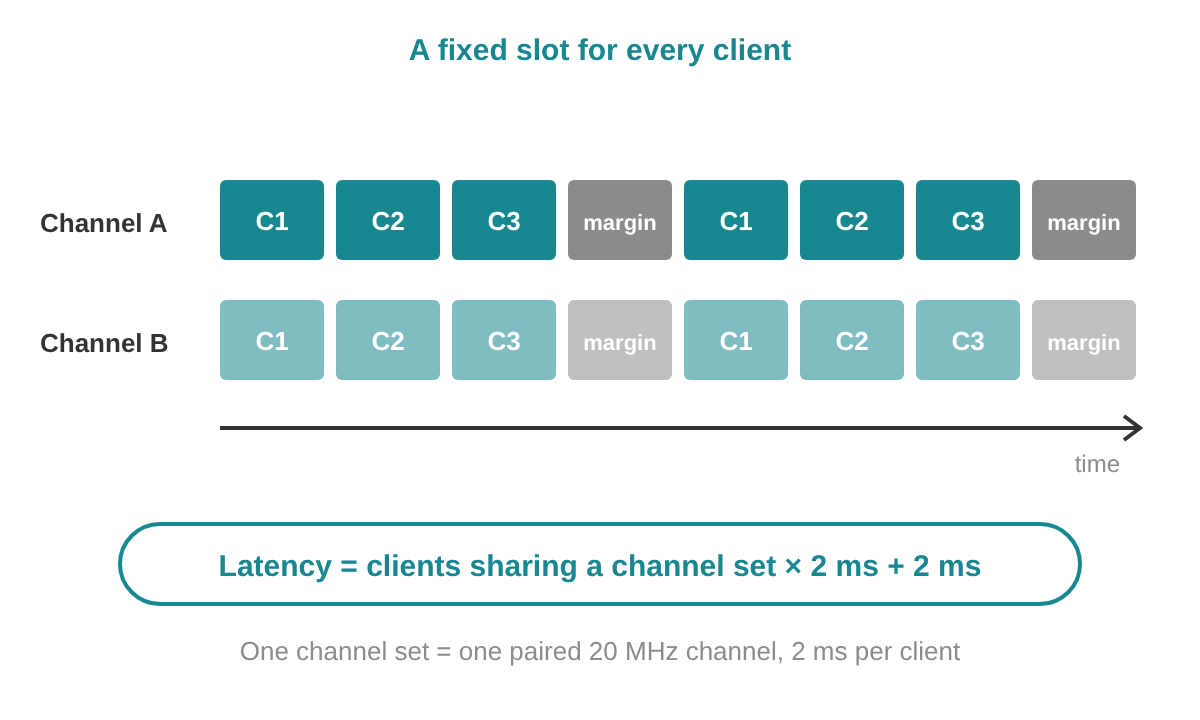
BlitzFunk: a fixed slot per client
BlitzFunk transmits Ethernet frames in a fixed time-frequency grid that reserves resources for each client, so every client has its own slot. That makes the latency predictable: clients sharing a channel group × 2 ms + 2 ms. Redundancy in frequency and space keeps the quality high, and every device logs signal strength and transmission statistics per client, live and via the API.
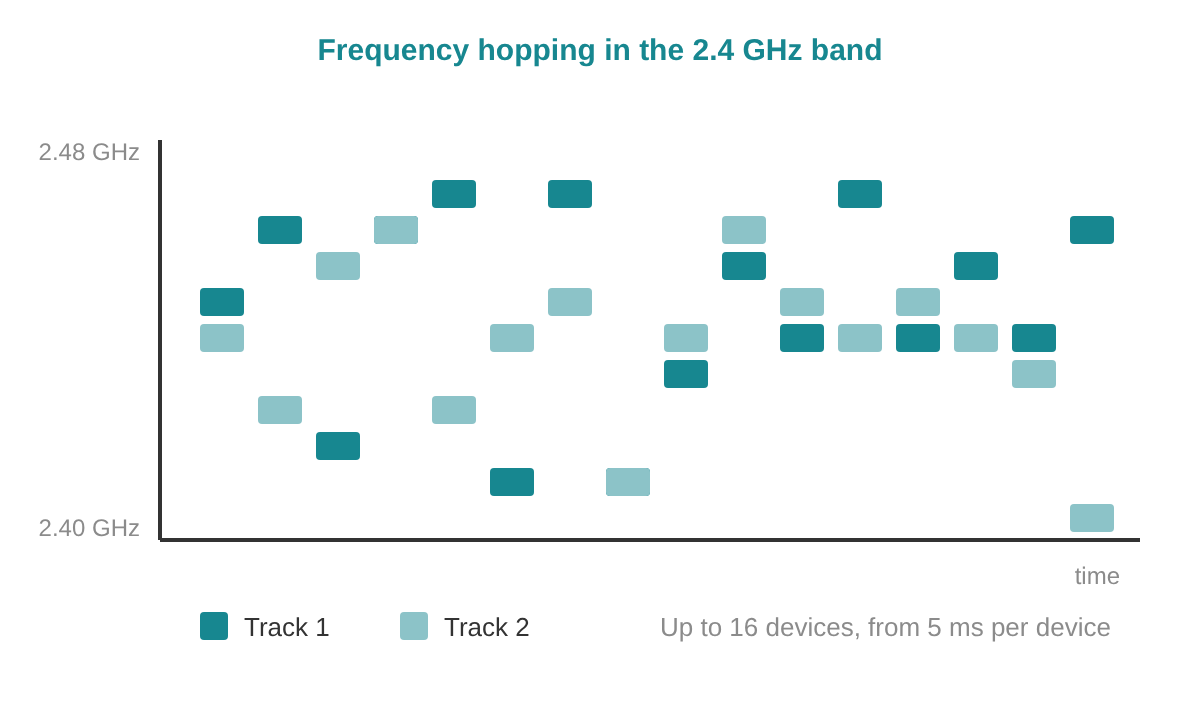
IO-Link Wireless: frequency hopping
IO-Link Wireless hops between frequencies in the 2.4 GHz ISM band, on two parallel tracks for up to 16 devices, from 5 ms per device. As an IEC standard it uses the normal IO-Link tools and IODD files; the IO-Link page covers planning a cell.
Before you build
What we check first on a wireless link
- Antenna outside the cabinet. Outside a metal cabinet the antenna reaches its full range; in a plastic cabinet it can stay inside.
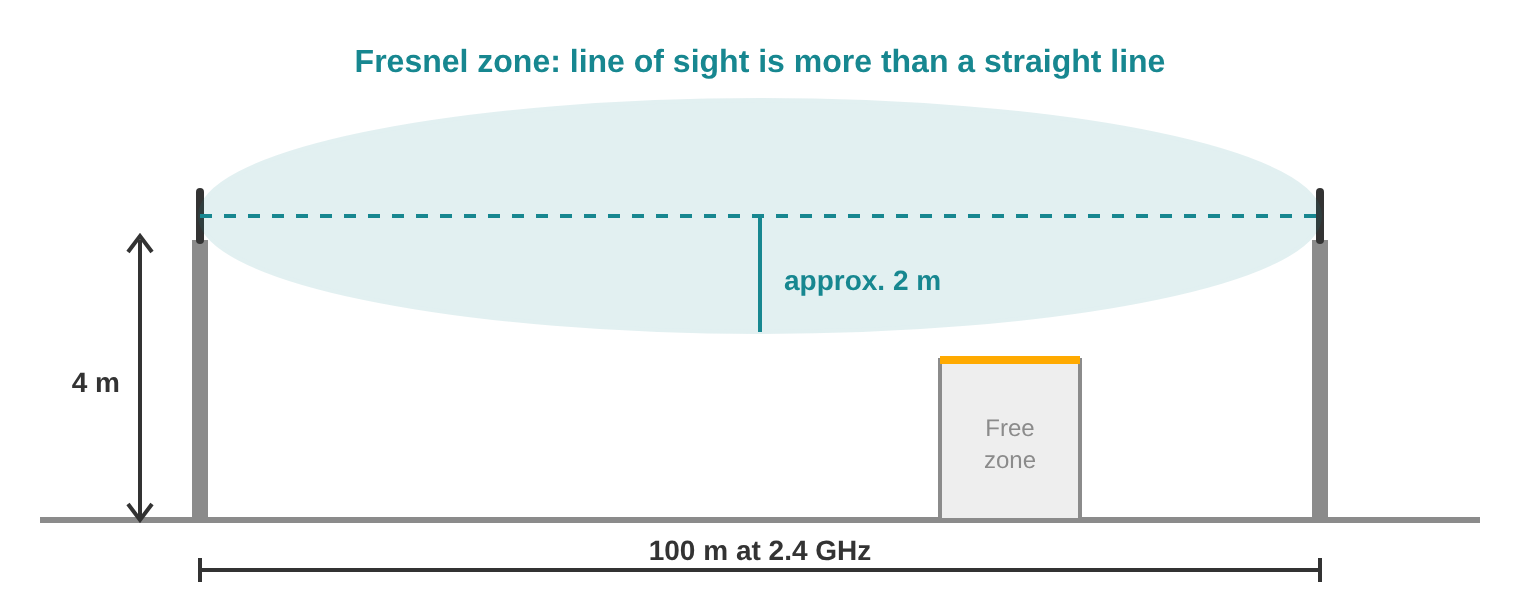
- Clear Fresnel zone. Line of sight is more than a straight line: at 2.4 GHz over 100 m the zone around it has a radius of about 2 m, so mount the antennas at about 4 m.
- Distance to metal and drives. Mount antennas with distance to metal parts, motors and frequency converters for a clean signal.
- Same polarisation at both ends. Vertical with vertical, RHCP with RHCP. A fixed RHCP antenna also combines well with a vertical one on a turning object.
- Cable and connectors. Antenna cable below 10 m, bending radius at least 30 mm, connectors tightened by hand.
- Parallel links 2 m apart. Antennas of two separate dataeagle links side by side work best with about 2 m between them.
- Overlap along the route. With BlitzFunk each access point reaches up to 50 m with line of sight; one every 70 m on the same channel group gives overlap wherever clients roam.
- Radio systems in the area. List the Wi-Fi and other systems nearby. Bluetooth hops around occupied channels, 869 MHz has a band of its own, and BlitzFunk also uses 6 GHz and the SRD channels at 5.8 GHz.
Background
Wireless 101
How radio replaces the cable for PROFIBUS and PROFINET, with application examples.
Services for wireless links and the network behind them
Our network engineers look at the whole chain: from the antenna position and the radio link to the PROFINET, PROFIBUS or CAN network and the controller.
Before you build
Network design review
We check your wireless layout, antenna and access point positions and the network it connects to, and explain the consequences of each choice.
On site
Troubleshooting on site
We measure the network, find the cause and leave a report on the state of your network and how to keep it reliable.
Quick question
Advice by phone or online
Want to know whether wireless fits your application, or which antenna you need? Schedule a call with one of our engineers.
See all network services and our trainings.
Frequently asked questions
More questions? Ask us directly. For questions about the wired network, see our PROFINET FAQ.
Which wireless system for PROFINET?
For a point-to-point link or multipoint with up to 4 wireless stations, the dataeagle: the 473x series with Bluetooth 5, or the 4333 series at 869 MHz for 1 to 3 km. For moving clients that pass several access points, BlitzFunk, with 0 ms additional latency when a client roams and an access point every 70 m.
How do I put together a dataeagle order?
With Bluetooth 5, per station a base device and an interface option, master included, plus the configuration. For PROFIsafe via PROFINET from one master to two stations in the cabinet: 3 × 15475 (Compact 473x), 3 × 15483 (safety option, multipoint) and 1 × 10003 (configuration set 1 master, 2 slaves). For PROFIBUS with one master and two stations: 3 × 15375, 3 × 15381, 1 × 15383 (master) and 2 × 15384 (slave). The 869 MHz versions are complete devices: for PROFIBUS in the cabinet 1 × 11142 (master) and 2 × 11143 (slave).
Does PROFIsafe work wirelessly?
Yes, over Bluetooth 5. The dataeagle 473x carries PROFIsafe, CIP Safety and openSAFETY via UDP with option 15485 (point-to-point) or 15483 (multipoint). The dataeagle 373x carries PROFIsafe on PROFIBUS with option 15382. BlitzFunk supports PROFIsafe, CIP Safety and SafetyNET p.
Does the PLC project stay the same?
Yes. The dataeagle is plug and play and transparent like a cable: the configuration of the devices and the controller stays as it is. BlitzFunk is a drop-in replacement for wired Ethernet.
Does Bluetooth work next to Wi-Fi?
Yes. Bluetooth hops between many narrow channels and leaves out the occupied ones (adaptive frequency hopping), so the dataeagle shares the 2.4 GHz band well with Wi-Fi. The 869 MHz versions run in a band of their own, and BlitzFunk also uses the 6 GHz band and the SRD channels at 5.8 GHz.
What range can I expect?
With Bluetooth 5 typically 100 m indoors and 300 m outdoors; at 869 MHz 1 to 3 km outdoors, for PROFINET, PROFIBUS and CAN. The dataeagle 2730 reaches up to 70 m, a BlitzFunk access point up to 50 m with line of sight and IO-Link Wireless up to 10 m. Line of sight and the antennas decide the actual range.
2.4 GHz or 869 MHz?
Bluetooth 5 at 2.4 GHz for PROFIsafe, CIP Safety and openSAFETY and for links within a hall or site. 869 MHz for the longest distances in Europe, 1 to 3 km outdoors, as complete devices: dataeagle 4333 for PROFINET, 3333A for PROFIBUS and 6330 for CAN.
How fast is BlitzFunk?
Per channel group the latency is the number of clients × 2 ms + 2 ms, and 6 Mbit/s is shared between those clients: one client gets 4 ms, two clients 6 ms and 3 Mbit/s each. Roaming adds 0 ms.
How many BlitzFunk devices do I need?
One BlitzFunk Client per moving machine, and access points on the same channel group along the area: with line of sight one every 70 m, so clients roam with 0 ms added latency. For more capacity, add channel groups in parallel, each with its own access points; a group uses two 20 MHz Wi-Fi channels and at least 12 groups are available in most countries. Example: a 150 m aisle with eight AGVs in two groups of four takes 8 clients and 2 × 3 access points, at 10 ms and 1.5 Mbit/s per AGV. We plan the exact positions with your layout.
Which antenna do I need?
Directional antennas at both ends for fixed or linear links, omnidirectional antennas at both ends for moving stations, and a directional antenna with an omni antenna for one fixed and one turning object. Keep the antenna cable up to 10 m: 1 m (10629), 4 m (10273) or other lengths on request.
How stable is the link in a busy radio environment?
The dataeagle filter time, adjustable from 20 ms to 20 s, keeps the fieldbus running across short radio pauses; beyond that the PLC receives the status just as with a cable, so the safety functions respond. BlitzFunk reserves a fixed slot per client and logs signal strength and transmission statistics per client.
Planning a wireless link?
Tell us what moves, over which distance and which network the data comes from, and we help you choose the radio system and the antennas.