Your expert for PROFINET and industrial networks
Helmholz supplies the components and the knowledge to build, extend and maintain PROFINET networks according to the PI guidelines: PROFINET cable, patch cables and connectors, managed FLEXtra® switches, Single Pair Ethernet and Ethernet-APL, firewalls, couplers, wireless links for PROFINET and PROFIsafe, and the PROFINET TEST TOOL for diagnostics, plus design reviews, certification and on-site troubleshooting.
- PROFINET cable Type A, B and C, factory-made patch cables and EasyConnect® connectors
- Managed switches with Conformance Class B and MRP that appear in the topology and report port diagnostics
- WALL IE firewalls and couplers as a controlled conduit between machine and plant network
- PROFINET TEST TOOL Pro: topology, diagnostics and network load, with a report according to the PI guidelines
- Official PI Competence Center (PICC): design review, commissioning and certification


Go straight to: Cable and connectors · Switches · SPE and APL · Security · Couplers and gateways · Wireless · Diagnostics · Services. Or see all infrastructure components.
Cable, patch cables and connectors
The PI installation guidelines distinguish three PROFINET cable types by how much the cable moves. A copper link between two devices is at most 100 m; for longer distances, use fibre via a switch with SFP slots.
Selection
Which cable type do I need?
| Variant | Choose it when |
|---|---|
| Type A | The cable is installed fixed, for example in cable trays and control cabinets |
| Type B | The cable moves occasionally or is exposed to vibration, for example on machine parts |
| Type C | The cable moves continuously, for example in drag chains and on robots |

PROFINET cable
Fast Connect design for quick stripping and connector assembly.

PROFINET patch cables
Factory-made in fixed lengths, with RJ45 or M12 connectors. Conformance Class B for the CAT6 and CAT5e versions; one order number per length.
Note: use factory-made patch cables wherever the length allows. They are assembled and tested under controlled conditions, which rules out the most common cause of intermittent PROFINET faults: a badly assembled connector. Assemble connectors in the field only where a fixed length does not fit, for example for long runs or cable glands.

PROFINET connectors RJ45
Metal housing and tool-free EasyConnect® assembly for solid and stranded wire, 24 or 22 AWG.
Background
Why PROFINET patch cables?
What makes a PROFINET patch cable different, and which one fits your application.
Also in the range: the stripping tool for PROFINET for Fast Connect cable. See all PROFINET cable, patch cables and connectors.
PROFINET switches
The FLEXtra® family has managed PROFINET switches and unmanaged switches, in SLIM, FLAT, STAGE and IP67 designs. A managed FLEXtra® PROFINET switch is a PROFINET device itself: Conformance Class B, MRP client, visible in the topology, and it prioritises PROFINET frames when the network is busy.
Managed or unmanaged?
Managed – the switch takes part in the PROFINET network. In the topology view you see which device sits on which port, a broken cable is reported as a port diagnostic, and a replaced device gets its name automatically. What you want when faults must be found quickly.
Unmanaged – the switch forwards traffic straight out of the box, without configuration. Ideal for simple machine networks and extensions. All unmanaged Helmholz switches meet PROFINET Conformance Class A, so they work in a PROFINET network too.
Selection
Which design do I need?
| Variant | Choose it when |
|---|---|
| FLEXtra® SLIM | Space on the mounting rail is tight: the managed versions are 25 mm wide. Managed with 5 or 8 ports, or 6 RJ45 plus 2 SFP at 1 Gbit/s; unmanaged with 5 or 16 ports |
| FLEXtra® FLAT | You want a flat housing: managed with 4, 8 or 16 ports, unmanaged with 5, 8 or 16 ports, also with Gigabit |
| FLEXtra® STAGE | You need 16 ports or fibre: managed, stepped cable outlet, FO versions with SFP slots and RJ45 up to 1 Gbit/s |
| FLEXtra® IP67 | The switch is mounted outside the cabinet: 8 M12 ports, managed or unmanaged |
Managed PROFINET switches
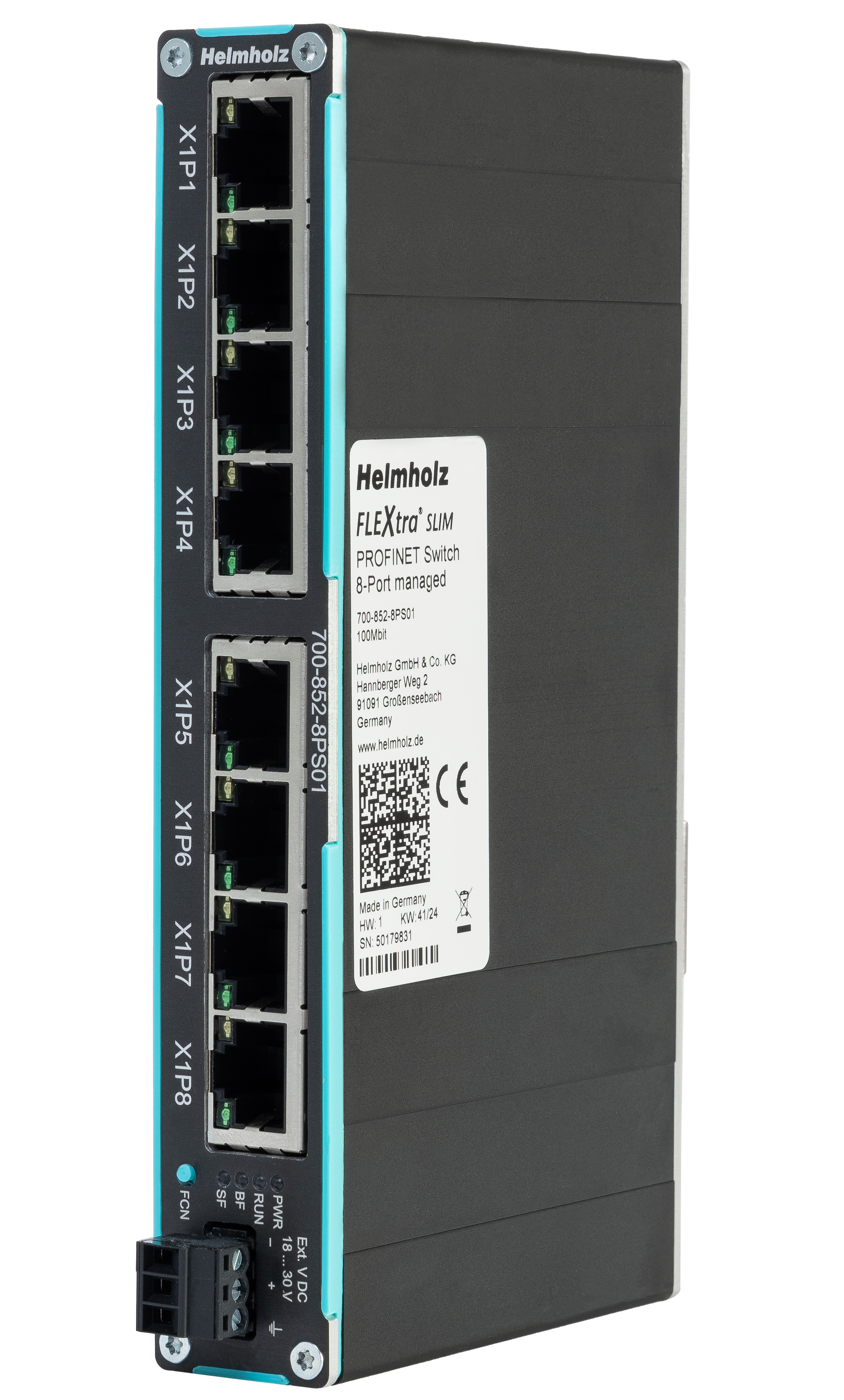
FLEXtra® SLIM, managed
25 mm wide, Conformance Class B, MRP client.

FLEXtra® FLAT, managed
Conformance Class B, MRP client; the 8-port version works from −40 to +75 °C.

FLEXtra® STAGE, managed
Stepped cable outlet; FO versions with SFP slots and RJ45 up to 1 Gbit/s.

FLEXtra® IP67, managed
700-857-8PS01. 8 M12 D-coded ports, Conformance Class B, MRP client, −40 to +75 °C.
Unmanaged switches, PROFINET compatible

FLEXtra® SLIM, unmanaged
For the smallest control cabinets.

FLEXtra® FLAT, unmanaged
With 100 Mbit/s or Gigabit ports.

FLEXtra® IP67, unmanaged
700-847-8ES01. 8 M12 ports, IP67, for mounting outside the cabinet.
SFP modules for fibre

SFP modules
For the switches with SFP slots: fibre where copper stops at 100 m.
Selection
Compare all FLEXtra® switches
Ports, speed, housing and Conformance Class side by side.
Background
PROFINET switch FAQ
Answers to the questions we get most about choosing a PROFINET switch.
Single Pair Ethernet and Ethernet-APL
Two-wire Ethernet takes the network further into the field. Single Pair Ethernet (10BASE-T1L) reaches up to 1,000 m with power over the same pair; Ethernet-APL brings PROFINET to field devices in the process industry, including hazardous areas. The PROFINET TEST TOOL Pro also analyses APL networks.
Selection
Which switch do I need?
| Variant | Choose it when |
|---|---|
| FLEXtra® SLIM SPE switch | You connect up to four SPE devices over long distances to an Ethernet or PROFINET network |
| aplSwitch Field | You connect intrinsically safe Ethernet-APL field devices in Zone 0 or 1 to PROFINET, with the switch in Zone 2 |
| aplSwitch Field PA | You mix Ethernet-APL and PROFIBUS PA field devices on one switch |

FLEXtra® SLIM SPE switch, unmanaged
700-848-6ES11. 4x 10BASE-T1L up to 1,000 m with PoDL up to 18 W, 2x RJ45 up to 1 Gbit/s. Conformance Class A, −25 to +75 °C.

aplSwitch Field
16 intrinsically safe Ethernet-APL spurs, Conformance Class B, MRP ring.
PROFIBUS PA
Mixing PA and APL?
The aplSwitch Field PA takes Ethernet-APL and PROFIBUS PA devices on the same 16 spurs. You find it with the PA gateways on our PROFIBUS page.
Background
What is Ethernet-APL? (NL)
How Ethernet-APL works and how it brings PROFINET into the process field.
Security: zones and conduits
IEC 62443 divides a plant into zones and allows traffic between zones only through defined conduits. For a machine network that conduit is either a firewall that passes only the IP traffic you allow, or a coupler that passes only the I/O data you configure.
Conduit for IP traffic
Firewall
The machine network must be reachable from the plant network, for example for programming, visualisation or data collection, without IP address conflicts. NAT, port forwarding and a packet filter on IP address, protocol, port and MAC address.
Conduit for process data
Coupler
The two networks only exchange process data: no IP route between them, galvanic isolation, and only the configured I/O data, up to 1,024 bytes in and out.
WALL IE firewalls

WALL IE Compact
700-863-WAL01. 2 ports, 100/1000 Mbit/s, quick to configure via the web interface, configuration import and export.

WALL IE Plus
700-862-WAL01. 8 ports at 100/1000 Mbit/s, each freely assigned to LAN or WAN, with user administration.

WALL IE
700-860-WAL01. 4 ports, 100 Mbit/s. NAT, port forwarding and packet filter.
Background
How NAT and bridge mode work
When to translate addresses and when to filter on layer 2, explained with WALL IE.
Which data needs to cross?
A conduit is only as tight as what you let through. Before you choose one, list which data really has to cross: which devices must be reached from the plant network and with which protocols, and which process values the controllers exchange. Allow exactly that and nothing more. Is it a fixed set of I/O data? Then a coupler is the simplest and tightest conduit.
Our whitepaper on the new EU security requirements explains what this means for machine builders. Couplers for every combination are below under couplers and gateways.
Couplers and gateways
A PROFINET coupler exchanges data between two controllers on separate networks: input data received on one side becomes output data on the other. It is configured with a GSDML file in your own engineering tool, isolates the networks galvanically and passes only the configured data, which also makes it a tight conduit between two zones.
Selection
Which coupler do I need?
| Variant | Choose it when |
|---|---|
| PN/PN coupler | Two PROFINET controllers need to exchange data: up to 1,024 bytes, MRP, no extra software |
| PN/EtherNet/IP coupler | A PROFINET controller and an EtherNet/IP PLC exchange data: up to 1,024 bytes; the coupler supplies the matching EDS file |
| PN/EtherCAT coupler | A PROFINET controller and an EtherCAT master exchange data: up to 600 bytes, configured with GSDML and ESI |
| PN/ModbusTCP coupler | Modbus TCP clients need PROFINET data: the coupler is a Modbus TCP server with up to 1,024 bytes |
| PN/MQTT coupler | You publish PROFINET data to an MQTT broker: up to 1,024 bytes, TLS encryption, MQTT 3.1.1 and 5 |

PN/PN coupler
Galvanic isolation of the networks, MRP, configured with GSDML only. 0 to 60 °C.

PN/EtherNet/IP coupler
700-160-3EN02. Configure the I/O data in your PROFINET engineering tool and download the matching EDS file from the coupler.

PN/EtherCAT coupler
700-161-3EC02. Up to 600 bytes in and out, configured in TIA Portal, CODESYS or TwinCAT.

PN/ModbusTCP coupler
700-159-3MB02. Modbus TCP server, up to 1,024 bytes, configured with GSDML only.

PN/MQTT coupler
700-162-3MQ02. Separate PROFINET and MQTT networks, authentication by password or certificate, TLS.
Other networks
CAN or PROFIBUS to PROFINET
Gateways for CAN and PROFIBUS have their own pages, with selection tables, all variants and the common faults per network.
CAN bus
CANopen, CAN Layer 2 and SAE J1939
The PN/CAN gateway SLIM and FLAT brings CAN data straight into the I/O area of your PROFINET controller: CANopen master or slave, Layer 2 or J1939, configured via GSDML.
PROFIBUS
PROFIBUS DP and PROFIBUS PA
The DP/PN coupler, the PROFIBUS proxy in a connector and the pnGate PA connect PROFIBUS DP and PA devices to your PROFINET controller.
Selection tool
Every protocol combination
Gateway selection tool
Find the right gateway or coupler
Choose two protocols and see which products connect them: PROFINET, PROFIBUS, EtherNet/IP, EtherCAT, Modbus, CANopen, CC-Link IE, MQTT and more.
Overview
All PROFINET gateways and couplers
Including the CC-Link IE Field to PROFINET coupler and the Real-Time Ethernet gateways.
Wireless PROFINET and PROFIsafe
Where cables wear out or cannot be laid, such as rotating machine parts, cranes, transfer cars and AGVs. Which solution fits depends on whether the wireless station stays within reach of one base station or moves between access points.
Fixed links: point-to-point or multipoint
For a crane, a rotating table or a remote cabinet: one base station and up to four wireless slaves over Bluetooth 5, up to 400 m, for PROFINET and PROFIsafe.

dataeagle 473x series
Base device plus an interface option for PROFINET and PROFIsafe, EtherNet/IP and CIP Safety, or openSAFETY via UDP. Up to 100 Mbit/s PROFINET.
Moving stations: roaming between access points
For AGVs and shuttles that move through a hall: no additional latency during roaming, and a guaranteed maximum latency of 4 ms for one client, plus 2 ms per extra client.

BlitzFunk
Real-time Wi-Fi for Industrial Ethernet, including safety protocols, in the 2.4, 5 and 6 GHz bands.
Antennas and cables: Bluetooth antennas and cables · 869 MHz antennas and cables. Background: wireless as an alternative to cables (NL).
Diagnostics and troubleshooting
Devices that drop out, a station that does not start up or a machine at standstill: first find where in the network it happens. The PROFINET TEST TOOL Pro shows the whole network in one scan, from topology to network load.
Troubleshooting
PROFINET TEST TOOL Pro
- Topology as an interactive graphic or a table
- Every device with name, model, serial number and PROFINET diagnostics, plus missing devices
- Critical links with too much traffic, and the impact of multicast and broadcast
- Actual update times and jitter
- Comparison with an earlier analysis
- Report according to the guidelines of PI
- Up to 2,500 devices per acquisition, Ethernet-APL included

PROFINET TEST TOOL Pro
Software for a Windows laptop, supplied in a case, optionally with an Ethernet TAP.
Monitoring and other tools
Faults that never show up while someone is watching need a tool that stays in the network. For a quick check without a laptop there is a handheld tester.

PROFINET TEST TOOL Online
4210-0004. Monitors your PROFINET network continuously and sends a notification when something changes.

Ethernet Cable Guard
700-200-LAN01. Monitors the service life of Ethernet cables to robots and other moving machine parts.

TAP IE 100
700-800-TAP01. Passive test access point for 10/100 Mbit/s lines, for permanent installation in the cabinet.

NaviTEK IE
R151010. Handheld tester that identifies network nodes and configuration without a PC and specialty software.
Network diagnostics
Troubleshooting or monitoring?
Cable testing, PROFINET diagnostics, traffic analysis and permanent monitoring: our network diagnostics page helps you choose the right tool.
When it fails
Rather have us measure?
Our engineers measure your PROFINET network on site, fix the cause and leave a report with advice to keep it reliable.
Common causes of PROFINET faults
Most intermittent PROFINET problems start in the physical network or in the network design, not in the software. These are the causes we find most often in the field, checked against the PI guidelines:
- Connectors assembled in the field – a badly assembled or damaged connector causes errors that come and go. Use factory-made patch cables wherever the length allows.
- Wrong cable type – a Type A or B cable in a drag chain breaks over time. Continuous movement needs Type C.
- Link too long – copper is limited to 100 m between two devices. Beyond that, use fibre via SFP modules.
- Network load – IT traffic, cameras, multicast and broadcast on the PROFINET network delay the cyclic frames. Managed switches prioritise PROFINET frames, a WALL IE or coupler keeps other traffic out, and the PROFINET TEST TOOL Pro shows which links are overloaded.
- Long lines – every device in a line forwards the traffic of all devices behind it, and one failure cuts them all off. Plan the topology, or close the line into an MRP ring.
- Unmanaged switches – a fault behind an unmanaged switch only shows up as devices that drop out. Use managed switches where you need diagnostics, and at least Conformance Class A elsewhere.
- Device names – a replaced device without the right name does not start up. With managed switches and topology information, the controller assigns the name automatically.
Services for PROFINET networks
As the official PI Competence Center (PICC) in the Netherlands we support PROFINET networks from design to operation, according to the PI guidelines. Our network engineers see the whole chain: from the cable and the switch to the controller, and via the coupler to the next network.
Before you build
Network design review
We check your PROFINET design against the PI guidelines, give neutral advice or a second opinion, and explain the consequences of each choice.
When it fails
Troubleshooting on site
We measure the network with the PROFINET TEST TOOL, analysers and testers, fix the cause and leave a report on what went wrong, the state of your network and how to keep it reliable.
Quick question
Advice by phone or online
Unsure about a topology, a coupler in your PLC project or a fault you cannot place? Schedule a call with one of our engineers.
For PROFINET we also offer commissioning and certification: we verify that your network and documentation meet the PI guidelines and certify the installation, at first installation, after an extension or during regular checks. With a periodical network checkup we install a PROFINET network monitor and report every three months on the state of your network. See all network services. Prefer to do it yourself? Join our PROFINET troubleshooting and commissioning workshop or one of our other trainings.
Frequently asked questions
Your question not listed? Ask us directly. For the full background: the PI guidelines for planning (order no. 8.061), installation (8.071) and commissioning (8.081) are available from PROFIBUS & PROFINET International.
Planning and installation
Which PROFINET cable type do I need?
That depends on how much the cable moves. Type A is for fixed installation, Type B for occasional movement or vibration, and Type C for continuous movement such as drag chains and robots. Wherever a fixed length fits, use a factory-made patch cable instead of assembling connectors in the field.
How long can a PROFINET cable be?
A copper link between two PROFINET devices is at most 100 m. For longer distances, use fibre: the FLEXtra® switches with SFP slots take SFP modules for multimode up to 500 m or 2 km and singlemode up to 10 km or 40 km.
Patch cables or assemble connectors myself?
Use factory-made patch cables wherever the length allows. They are assembled and tested under controlled conditions, which rules out badly assembled connectors, a common cause of intermittent faults. Assemble EasyConnect® connectors in the field only where a fixed length does not fit. Read more in our article on PROFINET patch cables.
Managed or unmanaged switch?
A managed PROFINET switch takes part in the network: it appears in the topology, reports port diagnostics and prioritises PROFINET frames. The managed FLEXtra® switches are Conformance Class B. An unmanaged switch forwards traffic without configuration; all unmanaged Helmholz switches meet Conformance Class A, so they work in a PROFINET network too. Compare all variants on the switches page.
What do Conformance Class A, B and C mean?
They define which PROFINET functions a device supports. Class A covers basic cyclic communication. Class B adds network diagnostics and topology information, which allows device replacement without a programming device. Class C adds isochronous real-time (IRT) for motion control. The managed FLEXtra® switches and the aplSwitch Field are Conformance Class B.
How do I connect two PROFINET controllers?
With the PN/PN coupler. It has a PROFINET IO device on each side and exchanges up to 1,024 bytes of input and output data between the two controllers. The networks are galvanically isolated, MRP is supported, and the coupler is configured with a GSDML file only, without extra software.
How do I connect a machine network to the plant network?
With a WALL IE. In NAT mode it translates the addresses of the machine network, so identical machines can keep the same IP addresses, and its packet filter only passes the traffic you allow by IP address, protocol, port and MAC address. If the networks only need to exchange process data, a coupler is an even tighter conduit: it passes only the configured I/O data.
Can PROFINET and PROFIsafe run wirelessly?
Yes. The dataeagle 473x transmits PROFINET and PROFIsafe by Bluetooth 5 over up to 400 m, point-to-point or multipoint, for fixed links such as cranes and rotating tables. For stations that move between access points, such as AGVs, BlitzFunk roams without additional latency, with a guaranteed maximum latency of 4 ms for one client plus 2 ms per extra client.
Operation and diagnostics
Is a PROFINET switch real-time capable?
Yes. The FLEXtra® PROFINET switches support PROFINET RT for cyclic data exchange. PROFINET RT uses the standard techniques of managed switches, such as Quality of Service, to give PROFINET frames priority over time-uncritical traffic like video streams or project downloads, so the IO cycle stays consistent.
What is device exchange during operation?
When a PROFINET device fails, the replacement is recognised by its position in the topology, through its PROFINET neighbours, and automatically gets its IP address and PROFINET name. The PLC then configures the new device and starts it. For this, the neighbouring devices, such as the switch, must support PROFINET.
Why does a PROFINET switch have an IP address and a name?
A managed PROFINET switch is an active infrastructure component. Via its IP address you reach its web interface, and PROFINET devices such as a PLC or programming device can configure it and read out information. In the project, the device name stands for the IP address, which keeps addressing simple.
What are I&M data?
I&M stands for Identification & Maintenance. These data describe a PROFINET device: partly from the manufacturer, such as order number and serial number, and partly written by the user, such as location and service contact. They can be read out with standard functions. The FLEXtra® PROFINET switches contain I&M data records.
What do the BF and SF LEDs mean?
BF shows logical bus faults: for example, the device has received no configuration, the configuration is incorrect, or no PROFINET communication is possible. SF shows group faults, such as an active PROFINET diagnostic.
What is port mirroring for?
To analyse PROFINET traffic, you can configure a free port of a managed switch as mirror port. It sends a copy of all frames of another port, so a PC with analysis software can read the traffic, as an alternative to a TAP in the line. FLEXtra® SLIM and FLEXtra® STAGE PROFINET switches offer port mirroring.
How do I find an intermittent PROFINET fault?
Start with a scan using the PROFINET TEST TOOL Pro: it shows topology, device diagnostics, missing devices, overloaded links and actual update times, and creates a report according to the PI guidelines. For faults that never show up while someone is watching, leave the PROFINET TEST TOOL Online or a TAP in the network to record what happens.
Can you certify our PROFINET network?
Yes. As the official PI Competence Center in the Netherlands we commission and certify PROFINET networks according to the PI guidelines, and we troubleshoot on site, often at short notice. You receive a report on the cause, the state of the network and advice to keep it reliable. Contact us to plan a visit.
Help with your PROFINET network
Designing a new PROFINET network, connecting it to the plant network, or chasing devices that drop out? Tell us which controller and devices you work with, and we will help you choose the right components or find the cause on site.