Switches, cabling, firewalls and Wi-Fi
Helmholz supplies the components and the knowledge for Industrial Ethernet in machines and plants: unmanaged FLEXtra® switches from 100 Mbit/s to 1 Gbit/s, an industrial PoE+ switch, RJ45 connectors and M12 patch cables, WALL IE firewalls between machine and plant network, industrial Wi-Fi and Ethernet barriers for hazardous areas.
- Unmanaged FLEXtra® switches in SLIM, FLAT and IP67 designs, 5 to 16 ports, all PROFINET Conformance Class A
- EasyConnect® RJ45 connectors up to 1 Gbit/s, IDC connectors up to 10 Gbit/s and drag-chain-compatible M12/RJ45 patch cables
- WALL IE firewalls with NAT, so identical machines keep their IP addresses on the plant network
- Design review, troubleshooting on site and advice by our network engineers

Go straight to: Switches · Connectors and patch cables · Security · Wi-Fi · Hazardous areas · Services · FAQ · Back to all infrastructure components
Switches
Unmanaged FLEXtra® switches are ready the moment they are powered: plug in the cables and the network runs. All of them meet PROFINET Conformance Class A, so they also work in machine networks that carry PROFINET. Choose 100 Mbit/s for machine networks and PROFINET devices, and 1 Gbit/s for a backbone or for cameras and file transfers.
Managed or unmanaged?
Unmanaged – the switch forwards traffic straight out of the box, without configuration. The right choice for a small machine network or a simple extension. All switches in this section are unmanaged.
Managed – the switch is visible in the network: you see which device sits on which port, and a broken cable is reported as a port diagnostic. The managed FLEXtra® PROFINET switches add ring redundancy (MRP) and give PROFINET frames priority when the network is busy. They are on the switches page, linked below.
Which design?

SLIM
The narrowest housing on the DIN rail, for cabinets with little space. 100 Mbit/s or 1 Gbit/s, also with SFP slots for fibre.

FLAT
A flat housing for enclosures with a shallow installation depth. 100 Mbit/s or 1 Gbit/s, 5 to 16 ports.

IP67
M12 ports for mounting on the machine instead of in a cabinet, −40 to +75 °C.
Unmanaged FLEXtra® switches

FLEXtra® SLIM
Ultra-compact, at 100 Mbit/s or 1 Gbit/s.

FLEXtra® FLAT
Light, rugged housing with a low installation depth.

FLEXtra® IP67
700-847-8ES01. 8 M12 ports, 100 Mbit/s, −40 to +75 °C, for mounting on the machine without a control cabinet.

Industrial PoE+ switch
LNP-800AGH-24-T. 8 ports at 10/100/1000 Mbit/s with PoE+ (IEEE 802.3at), up to 30 W per port, for cameras, access points and other devices powered over the data cable. −40 to +75 °C, DIN rail or wall mounting.
Selection
Compare all FLEXtra® switches
Managed PROFINET switches, fibre via SFP, Single Pair Ethernet and Ethernet-APL, side by side.
PROFINET
PROFINET infrastructure
Cable Type A, B and C, managed switches, couplers and the PROFINET TEST TOOL, for a network according to the PI guidelines.
Connectors and patch cables
A copper Ethernet link between two devices is at most 100 m. For 100 Mbit/s two wire pairs are enough; 1 Gbit/s uses all four pairs, so it needs 8-wire cable and 8-pole connectors.

RJ45 connectors, EasyConnect®
Metal housing, tool-free assembly in one step, for solid and stranded wire, IP20.
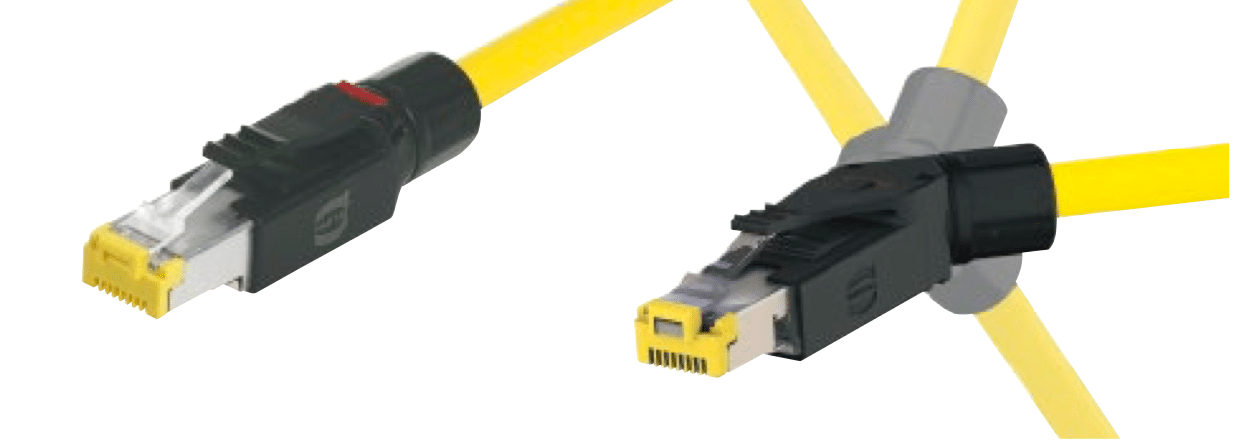
RJ45 connectors, IDC up to 10 Gbit/s
Cat. 6, class EA, fully shielded and suitable for PoE+. For solid and stranded wire, AWG 22 to 27.

Patch cables M12/RJ45
Pre-assembled on both sides, M12 D-coded to RJ45, PUR, drag chain compatible, 100 Mbit/s.
Note: use factory-made patch cables wherever the length allows. They are assembled and tested under controlled conditions, which rules out the most common cause of intermittent network faults: a badly assembled connector.
Background
Why PROFINET patch cables?
What makes an industrial patch cable different, and which one fits your application.
Cable
Installation cable and RJ45 patch cables
Cable Type A, B and C and factory-made RJ45 patch cables in fixed lengths are on our PROFINET page.
Security: firewalls between machine and plant
A WALL IE connects a machine network to the plant network without IP address conflicts, with a packet filter in between. In NAT mode it translates addresses, so identical machines keep the same IP addresses; it passes only the traffic you allow by IP address, protocol, port and MAC address. The WALL IE family follows the zones-and-conduits approach of IEC 62443.
| Variant | Choose it when |
|---|---|
| WALL IE Compact | One machine network goes to the plant network: one LAN and one WAN port at 100/1000 Mbit/s |
| WALL IE Plus | Several networks meet at one firewall: 8 ports at 100/1000 Mbit/s, each assigned to LAN or WAN |
| WALL IE | Four ports at 100 Mbit/s are enough |

WALL IE Compact
700-863-WAL01. 2 ports, 100/1000 Mbit/s, NAT and bridge mode, quick to configure via the web interface, configuration import and export.

WALL IE Plus
700-862-WAL01. 8 ports at 100/1000 Mbit/s, each freely assigned to LAN or WAN, with user administration.

WALL IE
700-860-WAL01. 4 ports, 100 Mbit/s. NAT, port forwarding and packet filter.
Background
How NAT and bridge mode work
When to translate addresses and when to filter on layer 2, explained with WALL IE.
Gateway selection tool
Only process data needs to cross?
A coupler passes only the configured I/O data, without an IP route between the networks. Choose two protocols and see which products connect them.
Industrial Wi-Fi
An industrial access point gives laptops, tablets and service devices access to the machine network, or bridges a link where a cable cannot go. Standard Wi-Fi has no guaranteed latency; for cyclic control data and safety protocols, such as on AGVs and cranes, choose a real-time wireless solution.

Industrial Wi-Fi access point
AMS-2111. IEEE 802.11b/g/n up to 150 Mbit/s, access point, client, bridge and repeater mode, redundant 12 to 24 V DC inputs, VLAN, management via HTTPS and SSH.
Wireless
Real-time wireless for PROFINET and PROFIsafe
dataeagle for fixed links such as cranes and rotating tables, BlitzFunk for stations that roam between access points.
Wireless
All wireless solutions
Wireless links for PROFIBUS, CAN bus, IO-Link Wireless and I/O signals, plus antennas and cables.
Ethernet in hazardous areas
An Ethernet barrier takes a standard Ethernet link with RJ45 into a hazardous area, intrinsically safe and without a seal fitting. Fit a barrier at each end of the cable to protect both the transmit and receive lines.

Ethernet barriers
The BXF mounts in an explosion-proof housing in the hazardous area; the BAF is installed in the safe area or in a purged panel, up to 70 m away.
Ethernet-APL
PROFINET to field devices in Ex zones
The aplSwitch Field connects intrinsically safe Ethernet-APL field devices in Zone 0 or 1, with the switch in Zone 2.
Background
What is Ethernet-APL? (NL)
How Ethernet-APL works and how it brings PROFINET into the process field.
Troubleshooting
What we check first when an Ethernet machine network is unstable
- Duplicate IP addresses. Identical machines with the same addresses on one network give devices that respond intermittently or not at all. A WALL IE in NAT mode keeps each machine on its own addresses.
- Broadcast and multicast from the plant network. IT traffic that floods into the machine network delays the control traffic. A WALL IE between the networks filters broadcasts and multicasts.
- 4-wire cable on a Gigabit link. 1 Gbit/s needs all four pairs; with two pairs the link falls back to 100 Mbit/s or does not come up. Use 8-wire cable and 1 Gbit/s connectors.
- Connectors assembled in the field. A badly assembled connector causes errors that come and go. Use factory-made patch cables where the length allows.
- Links longer than 100 m. Copper stops at 100 m between two devices; beyond that, use fibre via a switch with SFP slots.
- Unmanaged switches without Conformance Class A in a network that carries PROFINET. They forward LLDP frames, so the topology in the PLC no longer matches and device exchange without a programming device stops working.
Services
Choosing the components is one part of a reliable network. Our network engineers also help with the design, and on site when something goes wrong.
Before you build
Network design review
We check your network design and give a neutral second opinion: topology, switch placement, separation of machine and plant network, and cabling.
When it fails
Troubleshooting on site
With analysers and testers we find the cause. You get a report with the cause, the state of your network and advice to keep it reliable.
Quick question
Advice by phone or online
A question about choosing a switch, a firewall setting or a fault you cannot place? Schedule a call via the contact form, by email or by phone.
Frequently asked questions
Your question not listed? Ask us directly. More about PROFINET itself, such as Conformance Classes and device exchange, is on our PROFINET page.
Planning and installation
How long can an Ethernet cable be?
A copper Ethernet link between two devices is at most 100 m. For longer distances, use fibre: the FLEXtra SLIM switch with 6x RJ45 and 2x SFP takes SFP modules for multimode fibre up to 500 m or 2 km and singlemode fibre up to 10 km or 40 km.
Which cable do I need for 1 Gbit/s?
1 Gbit/s uses all four wire pairs, so you need 8-wire cable and 8-pole connectors, such as the EasyConnect 1 Gbit/s connectors 700-901-1BB22 (90°) and 700-901-1BB12 (180°) for 8 x 24 AWG. For 100 Mbit/s, 4-wire cable is enough.
100 Mbit/s or 1 Gbit/s?
PROFINET devices and most machine networks communicate at 100 Mbit/s. Choose 1 Gbit/s for a backbone between cabinets or when cameras and file transfers share the network. The unmanaged FLEXtra switches come in both speeds, with 5 to 16 ports.
Can I use unmanaged switches with PROFINET?
Yes, as long as the switch meets PROFINET Conformance Class A. All unmanaged FLEXtra switches do: they handle LLDP frames the way PROFINET requires, so the topology and device exchange keep working.
How much power does the PoE+ switch supply?
The industrial PoE+ switch LNP-800AGH-24-T supplies up to 30 W per port according to IEEE 802.3at, on 8 ports at 10/100/1000 Mbit/s, from −40 to +75 °C.
Security and special areas
How do I connect identical machines to the plant network?
With a WALL IE in NAT mode. It translates the addresses of each machine network, so series machines keep the same IP addresses, and its packet filter passes only the traffic you allow by IP address, protocol, port and MAC address.
Firewall or coupler?
A firewall such as WALL IE passes the IP traffic you allow, for example for programming, visualisation or data collection. A coupler passes only the configured I/O data between two controllers, without an IP route between the networks, and is the tighter conduit when only process data needs to cross.
Can Ethernet run into a hazardous area?
Yes. Ethernet barriers make a standard Ethernet link intrinsically safe: the BXF is installed in the hazardous area, the BAF in the safe area, with a barrier at each end of the cable. For PROFINET field devices in Zone 0 or 1, use Ethernet-APL with the aplSwitch Field.
Can I order online?
Yes, most components, such as the FLEXtra switches, connectors, patch cables and the WALL IE Compact, are in our online shop. For the PoE+ switch and the Ethernet barriers, ask us for delivery information. The webshop FAQ explains ordering and delivery.
Help with your Ethernet network
Tell us about your machine or plant, and we will help you choose the switches, the cabling and the firewall between machine and plant network. Prefer to learn it yourself? Join one of our trainings and workshops.