PROFIBUS DP, PROFIBUS PA and MPI
Helmholz supplies the components and the knowledge to build, extend and maintain PROFIBUS DP and PROFIBUS PA networks and to connect them to PROFINET: connectors, cable, repeaters, couplers, proxies, PA gateways, wireless links and testers, plus design reviews, commissioning, certification and on-site troubleshooting.
- Bus connectors up to 12 Mbit/s with switchable terminating resistor, optionally with diagnostics LED
- Repeaters that detect the bit rate automatically from 9.6 kbit/s to 12 Mbit/s and isolate the segments
- Couplers, proxies and PA gateways that bring PROFIBUS DP and PA devices into PROFINET
- Official PI Competence Center (PICC): commissioning and certification according to the PI guidelines

Go straight to: Connectors · Cable and accessories · Repeaters · Couplers and gateways · PROFIBUS proxy · PROFIBUS PA · Wireless · Diagnostics · Services. Or see all infrastructure components.
PROFIBUS connectors
Every Helmholz PROFIBUS connector has a 9-pin Sub-D interface for up to 12 Mbit/s, an integrated switchable terminating resistor and a metalized housing for better EMC. They work from -25 °C to +85 °C and have no loose parts.
Selection
Which connector do I need?
| Variant | Choose it when |
|---|---|
| Screw terminal | You prefer the proven screw terminal connection |
| EasyConnect® | You want quick-connect mounting with a visual check that the cable is seated correctly |
| Diagnostics LED | You want to see bus activity, the terminating resistor and the station status at every node |
| M12 | You work with pre-assembled M12 system cables, which rule out connection errors |
| With PG | You want to plug in a programming device or an extra participant without opening the bus |

Screw terminal connectors
Cable outlet at 90°, 35° or axial; the 90° versions also with diagnostics LED.

EasyConnect® connectors
Quick-connect for FC standard cable, solid or flexible, with visual connection control.

PROFIBUS connector, 90°, M12
700-974-0BB12. Two M12 connections and a PG interface.
Note: switch the terminating resistor on at the first and last node of each segment only. The resistor is powered with 5 V by the device it is plugged into, so it only works while that device is switched on.
Cable and accessories
PROFIBUS cable in Fast Connect design for 9.6 kbit/s to 12 Mbit/s: 150 Ω impedance, 1 x 2 x 0.64 mm, violet sheath. Versions for fixed installation and for flexible applications.

PROFIBUS cable PB FC 1x2x0,64
Flame retardant; the fixed version works from -40 °C to +60 °C.

Active dropcable PROFIBUS for PG
3 m cable to connect a programming device. The integrated electronics mean it is not a stub.
Also in the range: the stripping tool for PROFIBUS for Fast Connect cable. See all PROFIBUS accessories.
Repeaters
A repeater regenerates the signal in level, slope and duty cycle, so you can make the bus longer, add more participants or build a star or tree topology. All Helmholz repeaters detect the bit rate from 9.6 kbit/s to 12 Mbit/s automatically and can also be used in MPI networks.
Selection
Which repeater do I need?
| Variant | Choose it when |
|---|---|
| Compact repeater | You need one extra segment without space in the cabinet or a 24 V supply: it plugs onto a device and takes 5 V from the PROFIBUS interface |
| twinRepeater | You want two isolated segments on the DIN rail, for example to extend a line |
| multiRepeater 4-way | You build a star topology with up to four segments from one device |
| multiRepeater 6-way | You need six segments from one device |
| profiPoint | You need an active terminator or measurement point that keeps working when bus participants are switched off |

PROFIBUS compact repeater
700-972-0RB12. Used instead of a connector; up to 1 km bus length with two compact repeaters.

FLEXtra® twinRepeater
Two segments, 500 V isolation between them and status LEDs per segment.

FLEXtra® multiRepeater
Star networks from one device, 500 V isolation between the segments; repeating can be switched off per segment.

FLEXtra® profiPoint
Active terminator and measurement point with its own 24 V supply; also powers a compact repeater or diagnostic connector.
Couplers and gateways
Connect PROFIBUS to PROFINET, to a second PROFIBUS network, to Modbus TCP or to Ethernet. A coupler exchanges data between two controllers; a gateway brings PROFIBUS devices under a controller on another network.
Selection
Which coupler or gateway do I need?
| Variant | Choose it when |
|---|---|
| DP/PN coupler | A PROFIBUS master and a PROFINET controller need to exchange data |
| DP/DP coupler | Two PROFIBUS networks, each with their own master, need to exchange data |
| netTAP 100 | Your PROFINET controller must control a PROFIBUS DP segment as its master, or you connect PROFIBUS to CANopen, Modbus RTU or a serial protocol |
| netTAP 50 | You integrate a single PROFIBUS device into PROFINET, EtherNet/IP or Modbus TCP with a compact gateway |
| mbGate DP | A Modbus TCP control system needs access to an existing PROFIBUS DP segment |
| NETLink® PRO Compact | You want to program, visualize or maintain S7 controllers remotely via Ethernet |
| Gateway modules | You want a modular gateway with one module per network, for example PROFIBUS to PROFINET, EtherNet/IP or EtherCAT |

DP/PN coupler
Up to 244 bytes in and 244 bytes out, MRP on the PROFINET side. Configured with GSD and GSDML only.

DP/DP coupler
700-158-0AD02. Up to 244 bytes each way, electrical isolation between the networks.

netTAP gateways
netTAP 100: master for up to 125 PROFIBUS slaves, device replacement in seconds via memory card. netTAP 50: compact, for a single device.
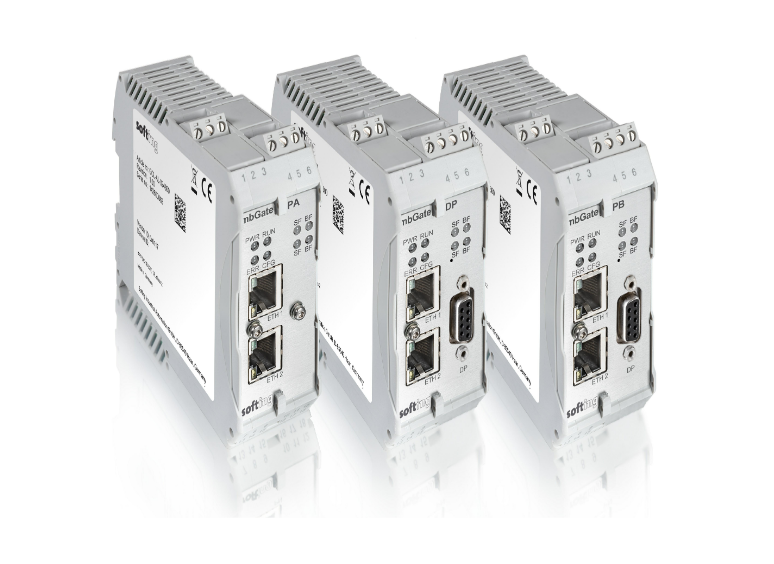
mbGate DP
GCA-EN-024806. Modbus TCP server and PROFIBUS DP master for up to 32 devices.

NETLink® PRO Compact
700-884-MPI21. Up to 16 TCP and 32 MPI/PROFIBUS connections, for S7-200, S7-300 and S7-400.
Selection tool
Other protocol combinations
Choose two protocols and see which products connect them. Or read more about couplers for PROFIBUS and PROFINET (NL).
PROFIBUS proxy
Keep a proven PROFIBUS DP device and run it on PROFINET. The netLINK PROXY plugs directly onto the DP interface of the device and appears in your PROFINET controller as an ordinary IO device, with alarms, diagnostics and DPV1.
- GSDML file generated automatically from the GSD file or a bus scan
- Certified device: no PROFINET certification of your own needed
- No terminating resistor needed on the short PROFIBUS link

PROFINET / PROFIBUS Proxy in a connector
1703.430_HB. netLINK PROXY, configured with SYCON.net.
Selection
Connecting a whole PROFIBUS network?
The proxy brings one DP device into PROFINET. For a complete DP network with its own master, or a DP segment under your PROFINET controller, use a coupler or gateway.
PROFIBUS PA
PROFIBUS PA brings PROFIBUS to the field devices of the process industry, with power and data over the same two wires at 31.25 kbit/s. Helmholz connects PA segments directly to PROFINET or Modbus TCP, combines PA with Ethernet-APL in the field, and supplies the tools to commission PA devices.
Selection
Which PA solution do I need?
| Variant | Choose it when |
|---|---|
| pnGate PA | Your PROFINET controller needs direct access to two or four PA segments, up to 64 PA devices, without a PROFIBUS DP intermediate segment |
| pnGate PB | You want one DP segment and up to two PA segments on PROFINET through one access point |
| mbGate PA | Your control system uses Modbus TCP and must reach PA segments |
| aplSwitch Field PA | You connect Ethernet-APL and PA field devices, or a mix of both, on one PROFINET field switch in Zone 2 |
| mobiLink | You commission, parameterize or maintain PA field devices from a tablet, smartphone or laptop |

pnGate and mbGate PA
Replace installed DP/PA segment couplers and re-use existing PA segments as they are. PROFINET redundancy, -40 °C to +70 °C, EDD parametrization with Simatic PDM.
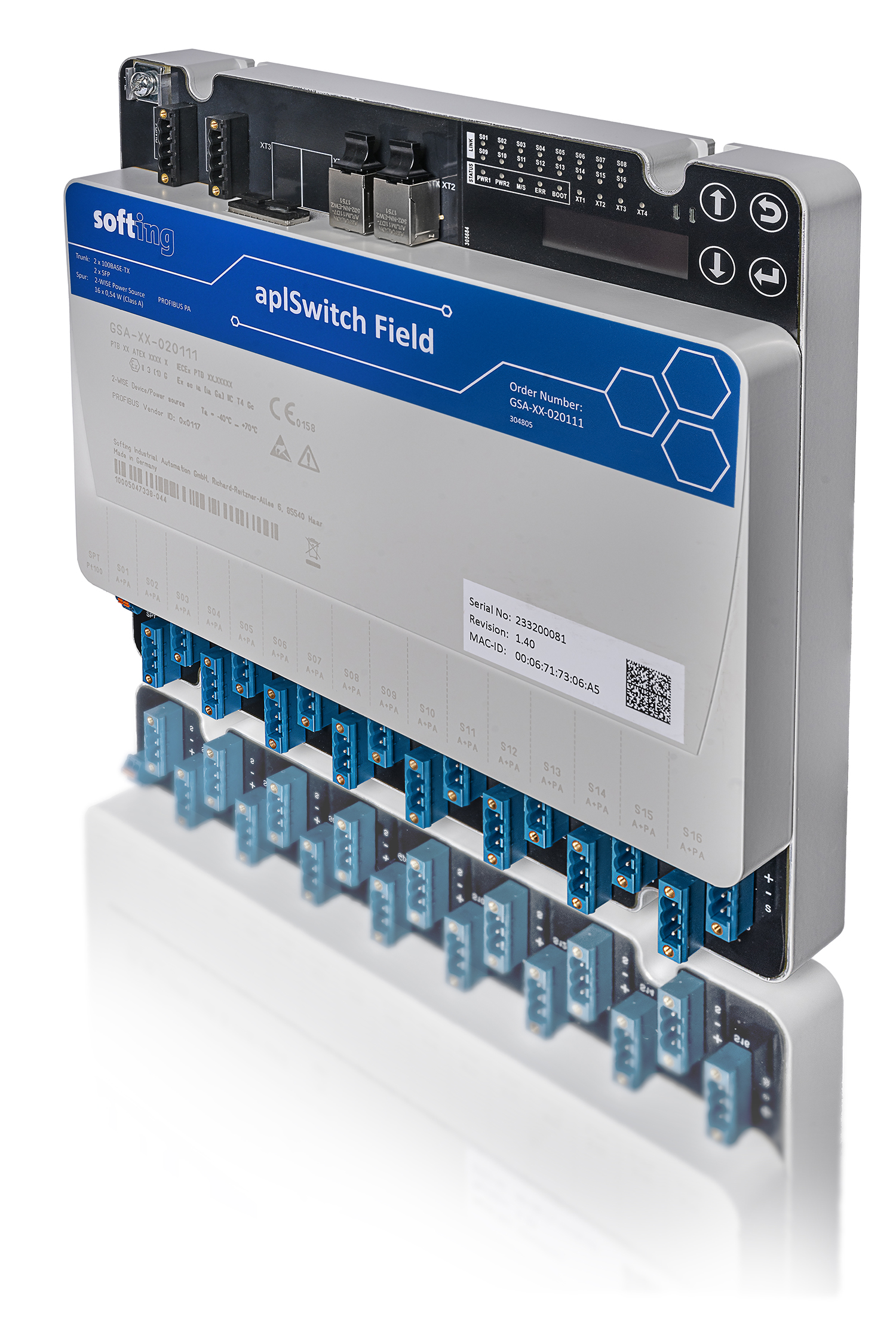
aplSwitch Field PA
16 intrinsically safe 2-WISE spurs for Ethernet-APL or PROFIBUS PA, MRP ring, Conformance Class B. Installed in Zone 2, field devices in Zone 0 and 1.

mobiLink interface
PROFIBUS PA master, HART master and FOUNDATION Fieldbus host in one device, via Bluetooth or USB. IECEx and Ex approved for Zone 1.
Ethernet-APL
From PA to Ethernet-APL
Ethernet-APL brings PROFINET to the process field on two wires. Read how it works and how PA and APL devices can share one field switch.
Analysing a PA segment? The PROFIBUS Tester 5 measures PA directly at the segment as well: feeding voltage, signal level, polarity and full protocol analysis.
Wireless PROFIBUS
Where cables wear out or cannot be laid, such as rotating parts, cranes and moving installations. The DATAEAGLE 3000 series transmits PROFIBUS DP transparently by radio at up to 1.5 Mbit/s, point-to-point or multipoint, including PROFIsafe and with an integrated PROFIBUS diagnostic slave. Bluetooth 5 covers 100 to 300 m, 869 MHz 1 to 3 km.

DATAEAGLE 3000 Compact
IP20, DIN rail mounting in the control cabinet.

DATAEAGLE 3000 X-treme
IP65, screw mounting for direct use in the field or outdoors.
Diagnostics and troubleshooting
Stations that drop out, repeats in the diagnostics or a plant at standstill usually start in the physical layer. The PROFIBUS Tester 5 tests cable, signal and communication of DP networks, and optionally PA.
For a quick check at every station, the connectors with diagnostics LED show bus activity (green), the terminating resistor (orange) and whether the station takes part in the bus traffic (blue).

PROFIBUS Tester 5
DDA-NN-006014. Signal tester, oscilloscope, protocol analyzer, master simulator and cable tester in one battery-powered handheld, PA option included.
When it fails
Rather have us measure?
Our engineers measure your PROFIBUS network on site, fix the cause and leave a report with advice to keep it reliable.
Common causes of PROFIBUS faults
Most intermittent PROFIBUS problems are physical, not software. These are the causes we find most often in the field:
- Termination – a missing, extra or unpowered terminator. Each segment needs exactly two, at the first and last node. With the power off you should measure about 110 Ω between A and B: two 220 Ω terminators in parallel.
- Segment length – the higher the bit rate, the shorter the segment: 100 m at 12 Mbit/s, 200 m at 1.5 Mbit/s, 400 m at 500 kbit/s and 1,000 m at 187.5 kbit/s.
- Too many stations – a segment carries at most 32 stations, repeaters included. Above that, add a segment with a repeater.
- Stubs – spur lines cause reflections, especially at higher bit rates. Use a repeater or an active dropcable instead.
- Shielding and grounding – interference causes repeats and errors that come and go with the machine’s load.
Services for PROFIBUS networks
As the official PI Competence Center (PICC) in the Netherlands we support PROFIBUS and PROFINET networks from design to operation, according to the PI guidelines. Our network engineers also see the whole chain, from the PROFIBUS station via the coupler to the PROFINET controller.
Before you build
Network design review
We check your PROFIBUS design against the PI guidelines, give neutral advice or a second opinion, and help you create documentation that meets the PI standards.
When it fails
Troubleshooting on site
We measure the bus with testers, analysers and oscilloscopes, fix the cause and leave a report on what went wrong, the state of your network and how to keep it reliable.
Quick question
Advice by phone or online
Unsure about a repeater layout, a DP/PN coupler in your PLC project or a fault you cannot place? Schedule a call with one of our engineers.
For PROFIBUS we also offer commissioning and certification: we verify that your network and documentation meet the PI guidelines and certify the installation, at first installation, after an extension or during regular checks. With a periodical network checkup we install a PROFIBUS network monitor and report every three months on the state of your network. See all network services and our trainings and workshops.
Frequently asked questions
How do I connect a PROFIBUS network to PROFINET?
That depends on who controls the PROFIBUS devices. If the PROFIBUS network keeps its own master, use the DP/PN coupler: it exchanges up to 244 bytes of input and 244 bytes of output data between the PROFIBUS master and the PROFINET controller, configured with a GSD and a GSDML file and no extra software. If the PROFINET controller must control the PROFIBUS devices itself, use the netTAP 100 as PROFIBUS DP master for up to 125 slaves.
How do I connect PROFIBUS PA devices to PROFINET?
With a pnGate PA. It acts as PROFINET device and PROFIBUS PA master and connects two or four PA segments, up to 64 PA devices, directly to your PROFINET controller, without a PROFIBUS DP intermediate segment. Installed DP/PA segment couplers can be replaced and existing PA segments re-used as they are. Need a DP segment as well? The pnGate PB connects one DP and up to two PA segments. For Modbus TCP control systems there is the mbGate PA.
Can I use PROFIBUS PA and Ethernet-APL devices together?
Yes. The aplSwitch Field PA has 16 intrinsically safe spurs that each take an Ethernet-APL or a PROFIBUS PA device, so you can mix both on one PROFINET field switch. The switch is installed in Zone 2; the field devices can be in Zone 0 and 1.
Can I use an existing PROFIBUS DP device in a PROFINET network?
Yes, with the PROFINET / PROFIBUS Proxy in a connector (netLINK PROXY). It plugs directly onto the DP interface of the device and appears in the PROFINET controller as an ordinary IO device, with alarms, diagnostics and DPV1. SYCON.net generates the GSDML file from the GSD file or a bus scan, and the proxy is a certified device, so no PROFINET certification of your own is needed.
How long can a PROFIBUS DP segment be?
It depends on the bit rate: 100 m at 12 Mbit/s, 200 m at 1.5 Mbit/s, 400 m at 500 kbit/s and 1,000 m at 187.5 kbit/s. For longer distances, add segments with a repeater; with two PROFIBUS compact repeaters a bus of up to 1 km is possible. Where a cable cannot be laid, the DATAEAGLE 3000 bridges 100 to 300 m via Bluetooth or 1 to 3 km at 869 MHz.
How many devices can I connect to one PROFIBUS segment?
At most 32 stations per segment, repeaters included. A repeater starts a new segment, so with repeaters you can connect more stations. A FLEXtra® multiRepeater creates up to four or six segments from one device.
Where do I switch on the terminating resistor?
At the first and the last node of each segment, and nowhere else. The resistor in the connector is powered with 5 V by the device, so it only works while that device is on. If the device at the end of the segment is sometimes switched off, use the FLEXtra® profiPoint as an active terminator with its own 24 V supply.
Can PROFIBUS run wirelessly?
Yes. The DATAEAGLE 3000 series transmits PROFIBUS DP transparently by radio at up to 1.5 Mbit/s, point-to-point or multipoint, and also supports PROFIsafe. The Bluetooth 5 version covers 100 to 300 m, the 869 MHz version 1 to 3 km.
Can you test and certify our PROFIBUS network?
Yes. As the official PI Competence Center in the Netherlands we commission and certify PROFIBUS networks according to the PI guidelines, and we troubleshoot on site, often at short notice. You receive a report on the cause, the state of the network and advice to keep it reliable. Contact us to plan a visit.
Help with your PROFIBUS network
Extending a PROFIBUS network, connecting it to PROFINET, or chasing stations that drop out? Tell us which controller and devices you work with, and we will help you choose the right components or find the cause on site.